FAQ - frequently asked questions#

Where to start?#

Feeling a little lost in the pricing jungle? No worries! Just book a free introductory consultation, where we’ll walk you through Pricing Fox in 30 minutes and show you there’s nothing to be afraid of. 💡

What data will Pricing Fox give me?#

We’ll be happy to serve you all the data you need for smart repricing. Pricing Fox automatically downloads information from:

  • Mergado – the product feed with all the information about your products.

  • Heureka – the prices of your products + the competition on the Czech/Slovak Heureka, and performance data from the conversion report.

  • Zboží.cz – product prices and the competition + statistics (clicks, orders, turnover)

  • Google Analytics 4 – an overview of the performance of your online store and products (clicks, orders, turnover).

  • Custom CSV – the option to upload your own reference prices for automated repricing.

I want Pricing Fox, what should I do?#

Great choice! 🦊 Let’s get to it:

  1. Check whether your online store can export products into an XML feed (see the glossary of terms for more).

  2. If it can, you’re all set! 🎉

  3. Just follow the “3 quick steps to your own pricing engine” guide, where you’ll find a detailed procedure and videos.

If you’ve hit any snag, write to us at podpora@pricingfox.cz and we’ll take a look at it together.

Will Pricing Fox rewrite the prices in my store without my knowledge?#

It won’t. The security of the entire process is a priority for us, so by default Pricing Fox transfers new prices only into a newly created element, PF_PRICE_VAT, which you can also reconfigure in the First-setup wizard or edit at any time on the Settings page. Only once you’re sure you want to send the automated prices directly to your store or a price comparison site do you set the element to the value you want.

How do I start repricing?#

Once you have Pricing Fox active, you can spring into action:

  • 🛠️ Create your first test rule – in test mode the real prices don’t change, so you have nothing to worry about.

  • 🚀 Choose between the quick wizard or detailed setup to suit your needs.

  • ⚙️ Run the rule in Mergado, watch the results in Pricing Fox, and once you’re satisfied, remove test mode and direct the new prices straight to your store!

I don’t want to reprice my products — what else can Pricing Fox help me with?#

Automated repricing is just one of many features you can use in your online store. If you don’t want to change prices automatically, you can:

  • 📊 Export price data into a clear table and share it with your product managers.

  • 🔍 Track competitor prices and keep an overview of the market without touching your own prices.

  • 🎯 Identify products suitable for PPC campaigns and focus only on the most profitable ones.

In short – use only what you currently need! 😊

What do input price, output price, and reference price mean?#

Confused about it? No problem! We’ve prepared a glossary of terms where you’ll find everything clearly explained. 📖

I’m not sure how to connect things so that the prices in my store and on Heureka don’t change differently. What if the products aren’t repriced often enough?#

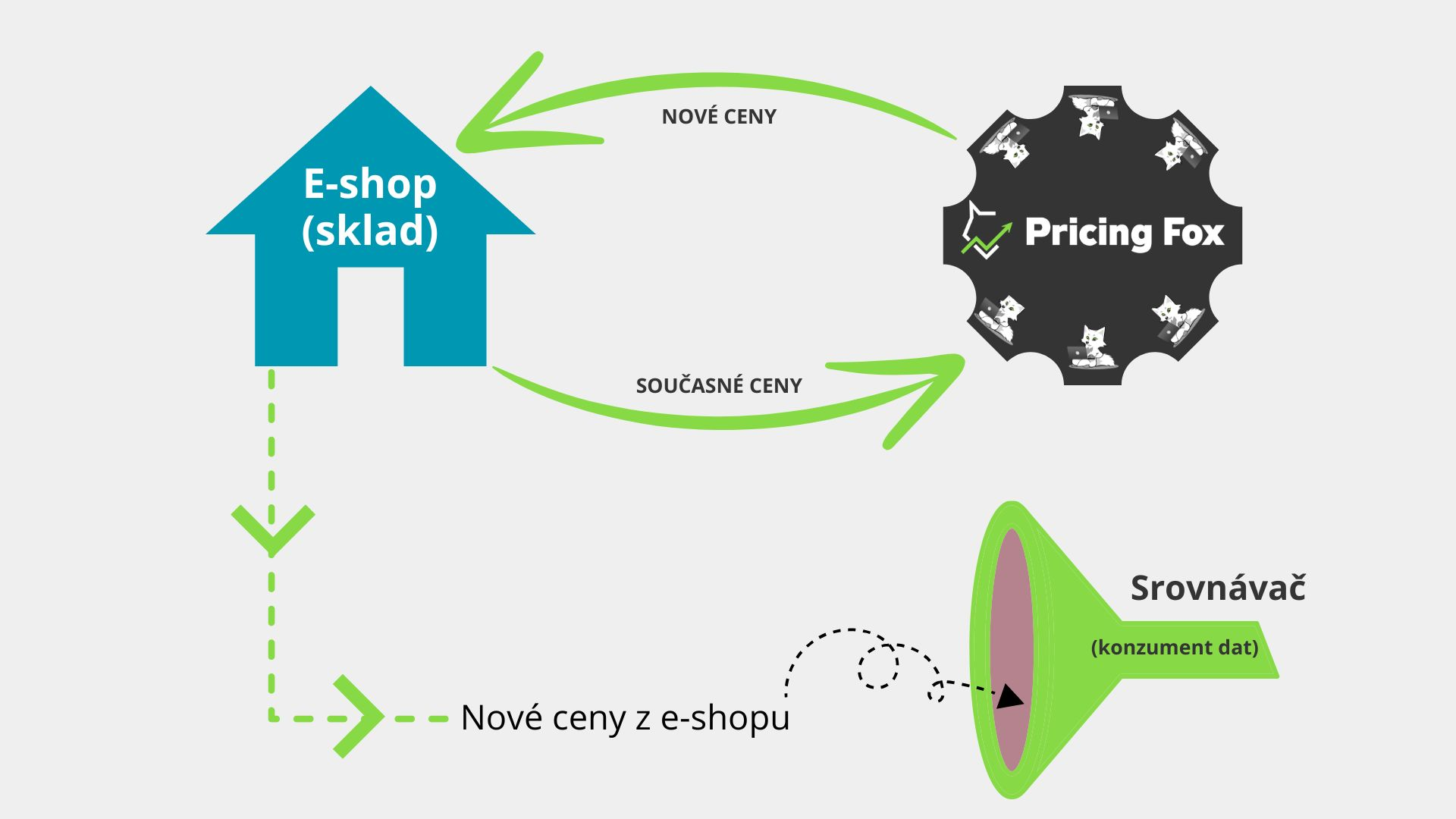
It’s simple. Even though everyone can choose their own data flow that suits them, our recommendation is clear. Take a look at our diagram:

The Pricing Fox connection diagram – step by step:

  1. Online store (inventory/accounting system)
    Contains your current prices and other product attributes.

  2. Passing data to Pricing Fox
    Through a regular export (XML/CSV/API) you send the current prices and product identifiers to Pricing Fox.

  3. Calculating new prices
    Pricing Fox applies your pricing requirements (margin, minimums, competition) and calculates the new prices.

  4. Returning the prices back to the store
    The new prices are sent the same way (export/API) back to your online store (or inventory system).

  5. Distribution to price comparison sites (Heureka, Zboží.cz …)
    The store feed with the updated prices travels to the price comparison sites – so all channels get uniform, fresh prices.

  6. Price comparison site (data consumer)
    Loads the new version of the feed from the store and shows visitors the current prices of your products.

This way you ensure uniform and regularly refreshed prices across all sales channels.

What if I forget something or set something up wrong and Pricing Fox doesn’t work correctly?#

Right from the first launch of the extension, our setup wizard guides you – just follow the steps we describe in detail and you won’t miss anything during setup.

We also recommend following the other descriptions in the extension, which anticipate customers’ most common questions – they clearly explain how to proceed in the individual steps that may not be obvious at first glance (you’ll find the descriptions under the icons as well).

And if even our explanations in the extension aren’t clear enough, don’t worry – we understand it’s a complex tool, and even though the interface is as intuitive as possible, you can still contact our support (by email or phone), arrange a personal consultation (online), or reach out to our certified partners.

What if I can’t set everything up to be happy with the resulting prices and end up losing money on it?#

On the first run you use test mode: prices are only simulated in it, without affecting the real feed.

In Pricing Fox you can define a minimum margin and other price boundaries (both minimum and maximum).

The system respects your own limits (e.g. “never below purchase price + 5% margin”) regardless of competitive pressures. You decide what happens to the product next – do you set up a “safety” rule where the price is adjusted according to the recommended price? Or at least the limits apply once a competitor is too low. Or – nothing happens to the price at all. The decision is entirely yours.

I need to keep my prices under control, but automation doesn’t really let me do that.#

On the contrary. Automation using the Pricing Fox extension lets you keep your prices under more control than if you repriced them manually.

Thanks to automation you have your prices under control in bulk, while at the same time you can track them in great detail across countless charts and tables, and, when necessary, you can also change prices manually for individual products.

The human factor is often fallible, especially if you have a larger number of products.

Competitors often change prices dynamically (even several times a day), and with a large number of products you can’t do without automation. Cluttered Excel spreadsheets and manual price changes aren’t efficient, and without automation you’ll probably never get ahead of your competition.

In Pricing Fox you have the option to track your direct competition and make decisions based on consistent data and facts, not just impressions. What’s more, you can change and adjust your business strategies very quickly thanks to the number of reports. They make decision-making fast and consistent. Besides the competition, you can see various other data about how your online store is doing on the market – both at a detailed and a more general level – find out in a single click how your specific products, segments, or categories are doing. You’ll immediately know which products are dragging down your performance and which, on the contrary, need a boost. Again, you see everything in a number of clear and interactive tables – so creating business strategies is simple and fast.

What if I want to lower prices on products but don’t want to go below the purchase price or below the minimum purchase price, while knowing that many competitors undercut this price?#

Thanks to the advanced options in rules, you can set the limit directly according to the purchase price.

You can enter this limit across the board as an absolute value or as a percentage, or you can choose the element in which you have the purchase price stated in the feed, and product prices won’t be offered below that amount.

Besides purchase price limits, the extension lets you set various other repricing restrictions (both minimum and maximum), for example according to the input price and more.

I have my own online store system – how demanding will it be to connect, and how many programmers will I need for it?#

It’s completely enough if your online store system allows uploading data feeds.

In the extension, within the output connection, you just select the Universal connector option. You set it up however you like – you can choose the desired export format (and, for CSV, the type of delimiter as well), and the extension creates a unique URL that is refreshed regularly. Just upload it into your store.

In the connector you can also choose whether all products will be sent, or only those that have been repriced. You can also set up other product details you’re interested in, and rename the elements in which the information is located to suit your own needs.

I only want to use Pricing Fox, I don’t understand Mergado and don’t use it – why do I have to pay for it?#

Pricing Fox is an extension running on the Mergado platform – Mergado handles feed manipulation, scheduling exports, and distributing prices.
Thanks to Mergado you have access to dozens of other add-ons (e.g. Feed Image Editor, Bidding Fox, and more) with no additional integration costs.

We connected the data source and filled in all the necessary elements, including the pairing one, but we can’t see our products anywhere. Are we making a mistake somewhere?#

Loading products can easily take up to 24 hours. During this time you’ll see the products being loaded into the app, and after that everything will work. But if you still can’t connect, proceed as follows:

If you use Keychain – verify in the Keychain extension that the connection really works correctly.

When connecting an XML feed – verify that you’ve inserted the correct feed and saved the settings.

Verify that you’ve entered the correct pairing element – it must match the one you send in the conversion feed to Heureka.

If you can’t connect despite the above, contact support.

What good is Pricing Fox to me when others use it too – doesn’t it then lose its point, and do I still have any competitive advantage at all?#

Pricing Fox is a tool; what’s essential is your strategy: setting your own goals is important, and not every competitor of yours may have as clear an idea as you do. Pricing Fox lets you analyze the market and set your own strategies – how you use that is entirely up to you.

What if I’m alone on a product card and want to lower prices using Pricing Fox? Won’t I get into a price spiral and have my product prices fall into negative values?#

If you’re alone on a product card, or you’re in the position the rule is currently targeting, Pricing Fox simply skips your store and won’t take it into account. So it won’t happen that you get into an unwanted, endless cycle of price cuts.

With a strategy of targeting the first position, we therefore recommend adding position no. 2 in the settings as well. This way you match the competitor in second place if you’re first but too cheap. Not only do you stay the cheapest and thus still attractive to buyers, but you also increase your margins on products that are too cheap.

Which feed should I upload to Pricing Fox? Will anything happen if it’s different from the one in Mergado?#

You don’t need to upload any feed to Pricing Fox – we load the product data directly from Mergado. Mergado supports hundreds of different formats, and if none of them suit you, you can also define a custom format.

Do I have to reprice only according to Heureka and Zboží? I want to use my own data, or just track the prices of my suppliers, for example.#

You can upload your own data to Pricing Fox as well, if you have a way to download it from somewhere.

You can use a CSV file for this and set the frequency of its updates. In the rules you then simply select the columns you want to work with during repricing.

You can also upload price data into elements in Mergado and work directly with them when creating rules.