
🧩 Other#
The Other tab groups together elements that do not belong to any price-comparison site: date and time, weather and currency rates. You activate the elements with the Generate switch. The controls are shared across all sources and are described in the introduction to the Interface section.
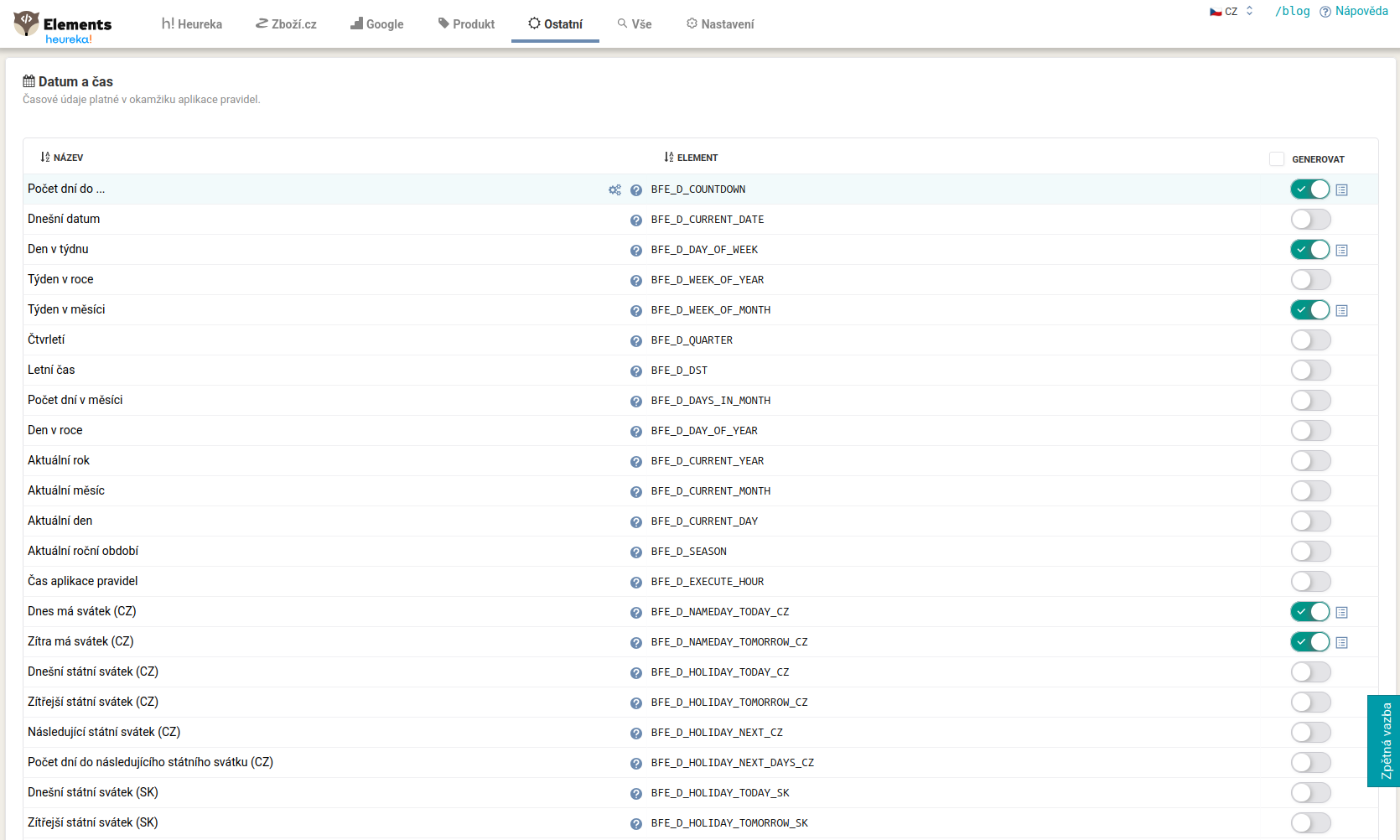
Date and time#
Time values valid at the moment of rule application, with the BFE_D_ prefix. This includes, for example:
BFE_D_COUNTDOWN(the number of days until a set date),BFE_D_CURRENT_DATE(today’s date),BFE_D_DAY_OF_WEEK,BFE_D_WEEK_OF_YEAR,BFE_D_WEEK_OF_MONTH,BFE_D_QUARTER,BFE_D_SEASON(day, week, quarter, season),BFE_D_NAMEDAY_TODAY_CZ,BFE_D_HOLIDAY_TODAY_CZ,BFE_D_HOLIDAY_NEXT_DAYS_CZ(name days and public holidays, with CZ and SK variants).
This is useful for timing promotions and campaigns (for example based on an approaching holiday). The day of the week (BFE_D_DAY_OF_WEEK) is a number from 1 to 7, where 1 is Monday and 7 is Sunday, so you capture the weekend with the value 6 or 7.
Weather#
A forecast for selected cities in the Czech Republic, Slovakia, Poland and Germany. The data is provided by OpenWeatherMap.org. For each city there are three elements with the schema BFE_W_[COUNTRY]_[CITY]_[TYPE]:
…_WEATHER(a textual state, for examplerain,fog,clouds,snow,sun),…_WEATHER_CODE(a numeric state code),…_TEMPERATURE(temperature).
Example: BFE_W_CZ_PRAHA_WEATHER, BFE_W_CZ_PRAHA_TEMPERATURE. A typical use is managing Google Ads based on the weather, where you write the state into custom_label and move products between campaigns accordingly.
Currency rates (ECB)#
Rates according to the European Central Bank with the BFE_C_ prefix, in the format source and target currency (for example BFE_C_CZK_EUR, BFE_C_EUR_CZK, BFE_C_USD_CZK, BFE_C_GBP_PLN). You use the rate in a calculation rule, for example to convert a price into another currency:
<PRICE_EUR> = [BFE_C_CZK_EUR] * [PRICE]
ČNB exchange rate list#
Foreign exchange market rates according to the Czech National Bank with the BFE_C_CNB_ prefix, in the format …_TO_CZK (for example BFE_C_CNB_EUR_TO_CZK, BFE_C_CNB_USD_TO_CZK). The rates are updated every hour.
FAQ#
-
How do I select a city for the weather? The location is part of the element name. You therefore choose the element for the given city (for example
BFE_W_CZ_PRAHA_WEATHER); there is no separate field for the city. -
What is the difference between
_WEATHERand_WEATHER_CODE?_WEATHERreturns a textual state (for examplerain),_WEATHER_CODEa numeric code for the same state, and_TEMPERATUREthe temperature. -
Should I use the ČNB or ECB rate? You find ČNB in the “ČNB exchange rate list” section (
BFE_C_CNB_…_TO_CZK), and ECB in the “Currency rates” section (BFE_C_…). Choose according to which rate you need for the conversion. -
How do I tell which direction the rate calculates? Watch the order of the currencies in the element name. One element returns how many crowns one euro costs, another the value of one crown in euros. Multiply or divide by the rate accordingly, so you do not convert the wrong way around.
-
Do I see the weather or a rate in the output feed? No, not until you reveal the element manually. By default the elements are hidden and serve only as input to rules.