
Zboží.cz#
1. What is Zboží.cz and why deal with it in pricing?#
Zboží.cz is a price comparison site from Seznam, and one of the most visited shopping portals in the Czech Republic. It lets customers compare online stores’ offers, not only by price but also by availability or rating. That’s exactly why it pays off to have competitive prices on Zboží.cz and work with them strategically – and Pricing Fox will help you with that.
2. I advertise on Zboží.cz – how do I connect it with Pricing Fox?#
You connect Zboží.cz to Pricing Fox simply, directly in the app, without needing to make any changes in Mergado. Just follow these steps:
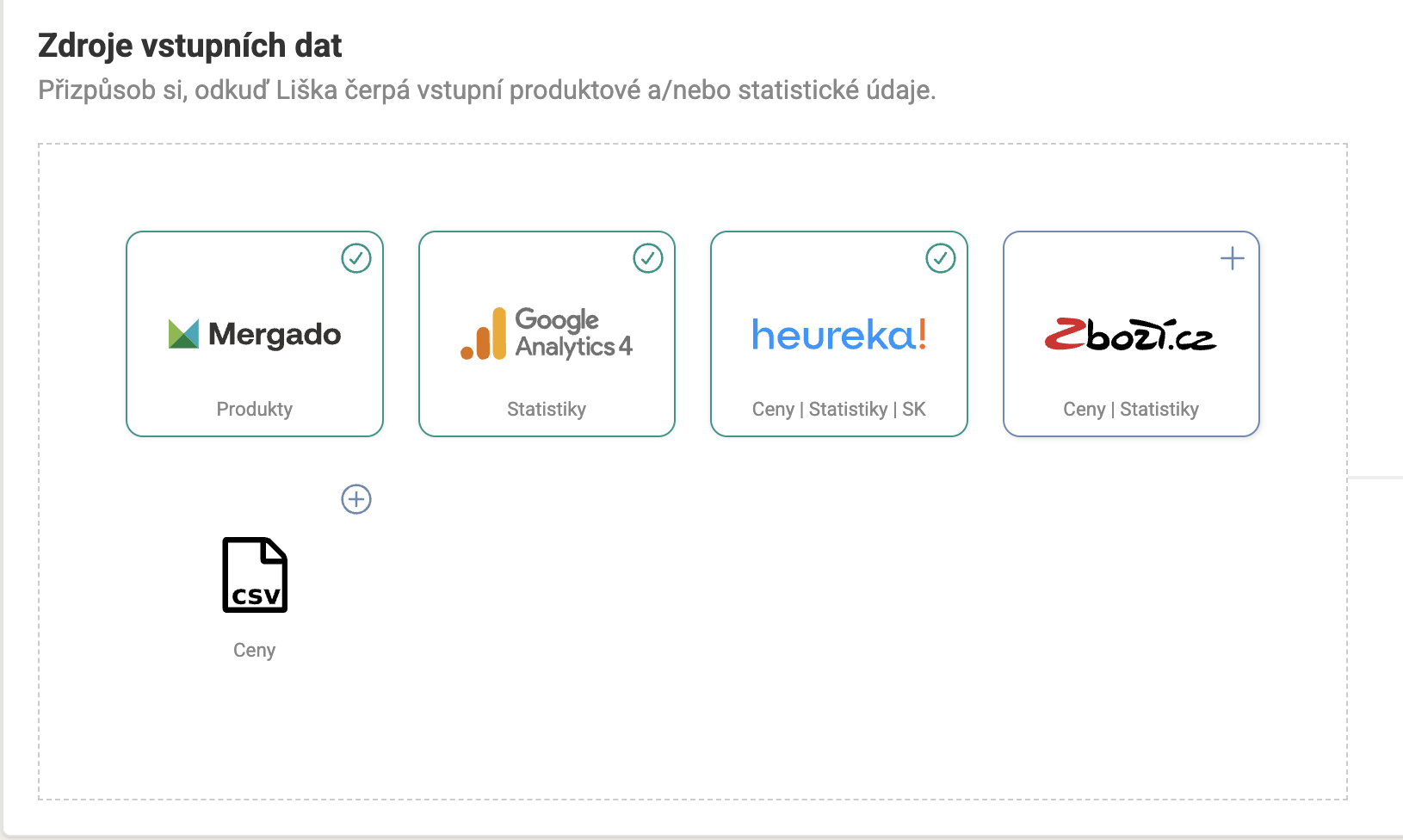
In the Connections menu in Pricing Fox, in the top Input connections section, choose the Zboží.cz option.
-
You’ll find Zboží.cz among the input data sources
-
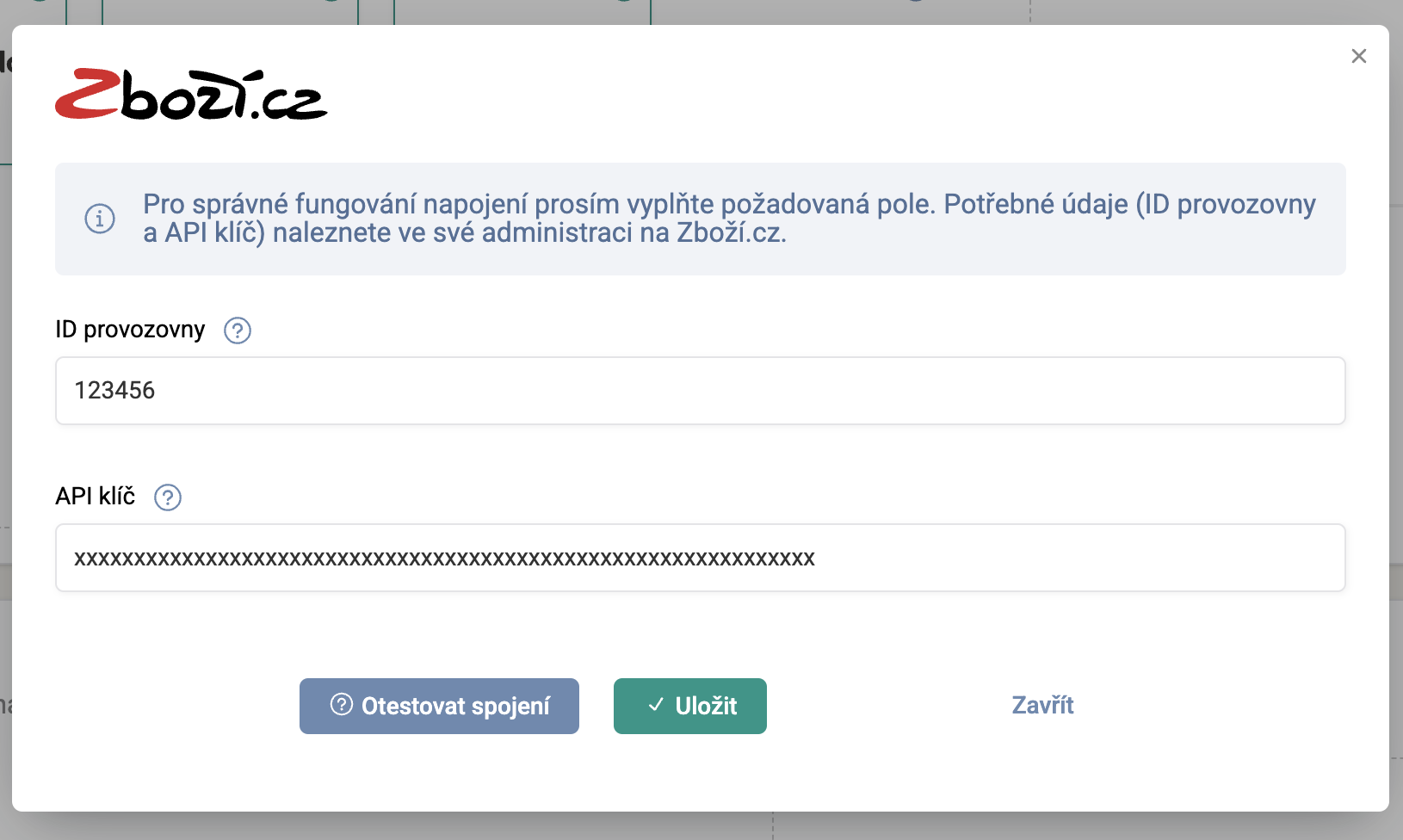
A window opens where you need to fill in the Business ID and API token. You obtain these details in the Zboží.cz administration:
-
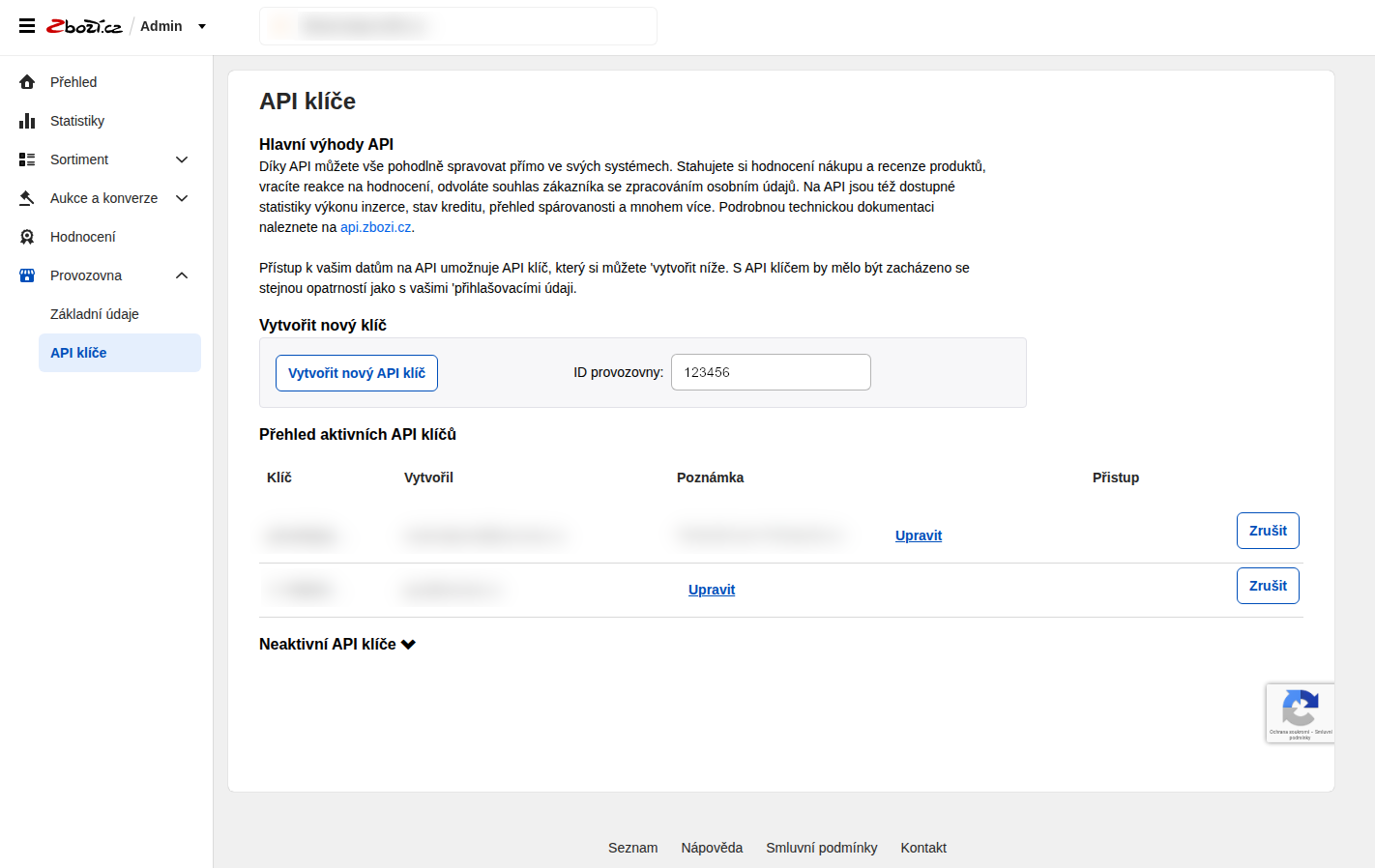
In Zboží.cz, go to the Business –> API keys section and click the Create new API key button.
You generate the API key in the Zboží.cz administration.
-
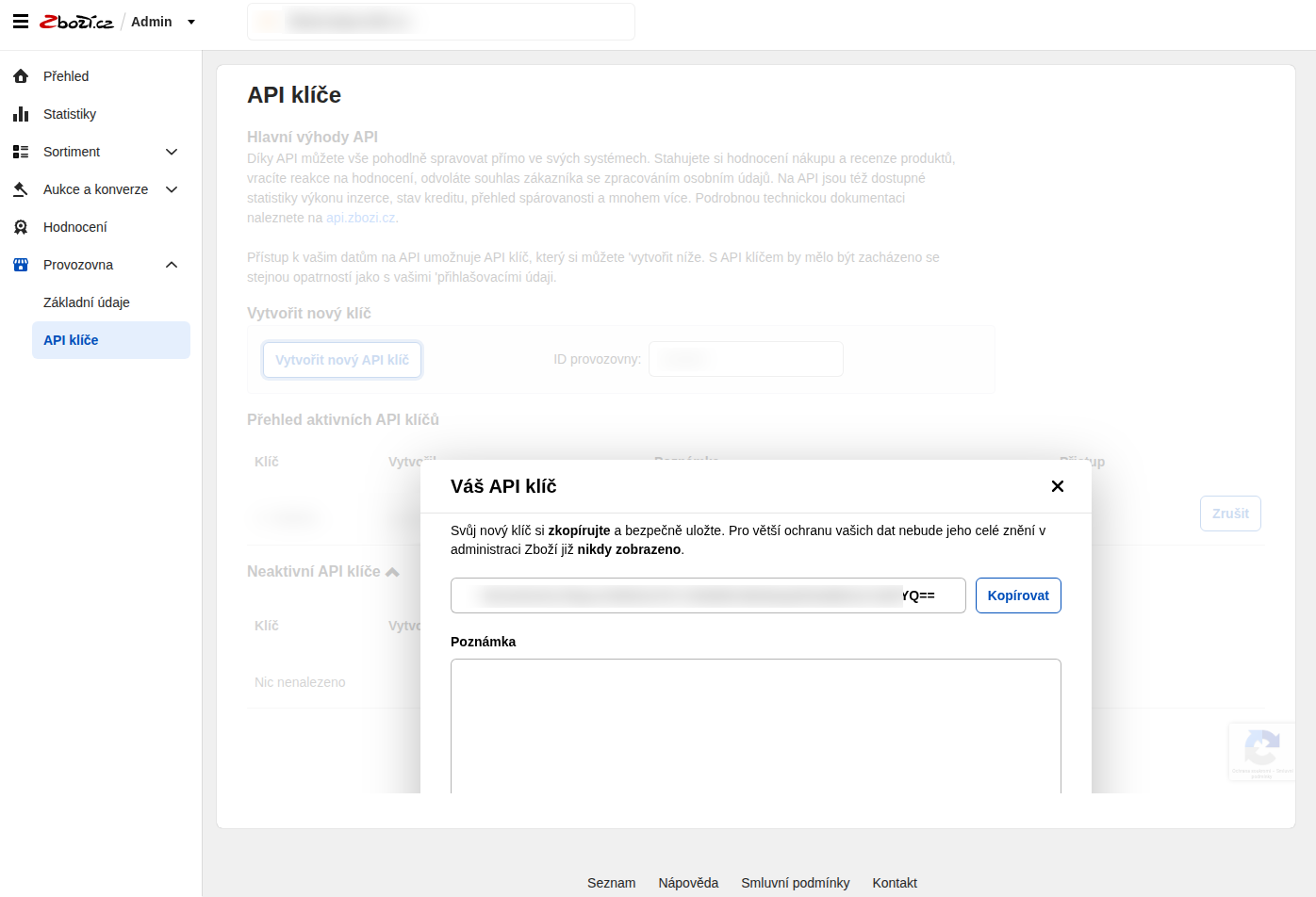
In the displayed window, copy the generated API key (it has 56 characters) and paste it into Pricing Fox.
You can create multiple API keys, but be careful: you can display each one only once. If you fail to copy it, create another and enter that into Pricing Fox.
-
On the same page you’ll also find the Business ID, which you also enter.
-
-
Click the Test connection button, and if everything is in order, save the link using Save.
✅ The connection is now done, and Pricing Fox will start loading data from Zboží.cz within 24 hours.
3. How do I connect Pricing Fox to Zboží.cz?#
Pricing Fox is a direct part of Mergado, so once you activate it and set up price strategies, new prices are automatically sent to the output feed in Mergado. So there’s no need to create any special link – the changes are written straight into the output feed, which stores normally send either directly to Zboží.cz or to their online store system. In the latter case, you then connect your store directly to Zboží.cz, if your solution supports it.
In Pricing Fox you can also decide for yourself which element the recalculated price should be saved into. The name of this element depends on the type of output feed in Mergado (e.g. for Zboží.cz the correct element is PRICE_VAT), and it can be edited at any time in the Project settings.
✅ Thanks to this, deploying recalculated prices to Zboží.cz is fully automatic and takes place within a single environment – Mergado.
4. What data and options from Zboží.cz can I use in Pricing Fox?#
Pricing Fox processes a range of data from Zboží.cz that will help you both with pricing and with market analysis. You have available:
-
Detailed competitor data – information about the number of competitors, the lowest and average price, your position in the listing, or the difference against the cheapest offer. You can use this data in queries and pricing rules.
-
Overview of competitor offers – for each product you can display competitor offers, including stores, prices, and positions. You can filter the listing and export it to CSV or Excel.
-
Competition report – a preview of the most frequently recurring competitors in your assortment. It helps you identify the key players it makes sense to respond to.
-
Product performance statistics – we download performance data from Zboží.cz (e.g. clicks, impressions) and display it at the level of products, projects, and individual rules. This lets you better evaluate the effectiveness of your strategy.
✅ All this data is available across the app and helps you better understand your position on the market as well as the performance of individual products.
5. How much does using Zboží.cz within Pricing Fox cost?#
The connection to Zboží.cz is part of the Pricing Fox service and isn’t charged separately. The price of the app is fixed, regardless of the number of products or the amount of repricing. Once you have Pricing Fox active, you can work fully with data from Zboží.cz – with no limitations or surcharges.
📌 You’ll find the current price list on the website pricing-fox.cz/cenik We treat all customers the same – with no individual offers and no hidden fees.
6. Do I have to have Zboží.cz active in Mergado to use Pricing Fox?#
You don’t. Pricing Fox obtains data from Zboží.cz via its own API connection, which you set up directly in the app. This means you don’t need to have an active output feed for Zboží.cz in Mergado – all that matters is that Pricing Fox works with data from Zboží.cz, and you then send the output feed from Mergado on (for example to your store or directly to the price comparison site).
7. What conditions must products meet for Pricing Fox to be able to compare them on Zboží.cz?#
For Pricing Fox to compare your product with the competition on Zboží.cz, it must be assigned to the correct product card. This means it must be paired in the Zboží.cz catalog – without pairing, competitor offers and the position in the listing can’t be determined.
Correct pairing usually depends on the quality of the feed, especially on the EAN code, product name, and category assignment. If a product isn’t paired, competitor data can’t be used for it in the app. Such products can then be repriced using another price comparison site (e.g. Heureka) or your own rules and data.
8. How often is data from Zboží.cz updated?#
Data from Zboží.cz is updated regularly, several times a day, in Pricing Fox. The update frequency depends on the availability of data from the Zboží.cz API, but there are usually several synchronizations during the day, so you have relatively fresh information about the competition and product performance available.
✅ You can verify the accuracy and currency of the data directly in the app, where you’ll find information about the time of the last update.
9. I don’t see competitor offers for some products. Why?#
The most common reason is that the given product isn’t paired into a product card on Zboží.cz. Without pairing, it’s impossible to determine who else offers the given product, so competitor offers aren’t displayed.
Another possible cause is that the product is paired, but you’re currently the only seller on the card. In that case, no competitor offers are displayed, because no competition currently exists.
✅ In both cases you can verify the status directly on Zboží.cz or using the preview of competitor offers in Pricing Fox.
10. Can I set price strategies according to my position on Zboží.cz?#
Yes, in Pricing Fox you can also target a specific position in the listing on Zboží.cz. In the rules you choose which place you want to reach (e.g. the TOP 3), and the app adjusts the price so it matches the competition at the desired position.
However, you need to bear in mind that the position isn’t fixed – it depends on the behavior of the other online stores and can change during the day. Pricing Fox therefore regularly updates the positions and adapts the strategy according to the current data.
At the same time, the system is designed so that an undesirable price spiral doesn’t occur. In Pricing Fox you can set limits – for example, by the purchase price (if you have it in the feed) or by the input and output price. The app also never reprices itself. If, for example, you’re aiming for the cheapest price on the card and you’re already the cheapest, you can, on the contrary, raise the price in such a situation and thereby increase your margin.
✅ This gives you not only a better position on the price comparison site, but also control over the profitability and long-term sustainability of your pricing policy.