
🎯 Strategies#
Strategies are the heart of Bidding Fox. In them you say which products to bid on, which position to target and which limits to observe. Bidding Fox then automatically adjusts the cost per click several times a day so as to keep products at the chosen positions at a reasonable cost.
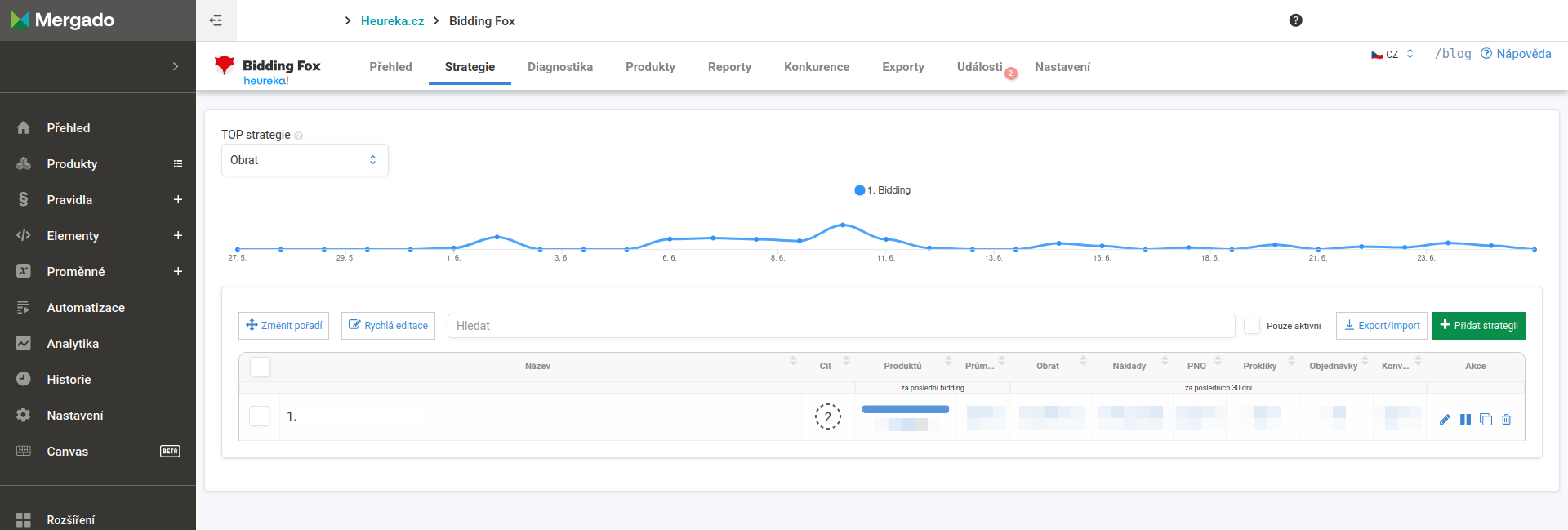
At the top of the page there is the TOP strategies chart (switchable, for example by revenue), and below it a list of all strategies.
List of strategies#
In the table you see for each strategy its order, name, goal (target position, MIN for strategies with only a minimum category CPC, or a dash for strategies that do not work with positions), the number of products and performance columns: average CPC for the last bidding and revenue, costs, PNO (cost/revenue ratio), clicks, orders and conversion rate over the last 30 days. Inactive strategies are marked with an Inactive label.
Above the table you find the Change order, Quick edit, Export/Import and Add strategy buttons, as well as search and the Active only switch. For each strategy there are actions to edit, pause/start, duplicate and delete.
Creating a strategy#
For each strategy you choose a name (we recommend a clear one right from the start so you can find your way around in reports and the interface) and a product query that it applies to. You can use an existing query from Mergado, a saved filter from Products, or set the strategy for all products.
A strategy can be marked as a test one. Bidding Fox then loads data for all products normally and calculates the cost per click “as if”, but does not write it into the output feed to Heureka or Zboží.cz. This comes in handy when you want to try out Bidding Fox from the inside or just pull data and exports from it without changing your current cost per click.
Strategy types#
For each strategy you choose what Bidding Fox should do with the products:
-
Automatic: standard bidding. Bidding Fox watches the target position and adjusts the cost per click several times a day. Most of the settings described below apply to it.
-
Set minimum category CPC: gives products the minimum cost per click of their category on the comparison site. This suits assortment you want advertised as cheaply as possible without dealing with positions.
-
Clear CPC: leaves the cost per click empty for the products, so they follow the settings in your account on the comparison site.
-
Hide product: Bidding Fox hides the selected products with the BF_HIDE rule in Mergado. They therefore do not reach the output feed for the comparison site and bidding no longer works with them. This typically suits products you do not want to advertise at all, for example items below the price level at which advertising pays off.
You do not set a target position for types other than Automatic.
💡 Place a hide strategy high in the order so that it catches the products before one of the bidding strategies below it takes them.
Target position and cost per click#
In a product card up to 4 bid positions are contested. You can target one specific position, or several. If Bidding Fox hits any of the selected positions, it is “satisfied” and does not move the offer any further until it becomes necessary.
The maximum cost per click (CPC) is a ceiling that Bidding Fox will not exceed. It can be entered in two ways:
-
fixed in crowns or euros,
-
as a percentage of the product price.
If you set both, the lower of the calculated amounts is always used.
⚠️ For a percentage CPC we recommend an absolute ceiling as well. With a varied assortment (products costing hundreds and thousands of crowns) a percentage could otherwise push the cost per click unexpectedly high.
The minimum cost per click is optional and is the threshold below which Bidding Fox should not go with the cost per click.
Cost limits#
-
PNO: Bidding Fox continuously calculates costs at the level of each product from data over the last 30 days. When a product approaches the set PNO or exceeds it, bidding is dampened or turned off. It is calculated according to the sources chosen in Settings.
-
Number of clicks to the first order: you give the product a “chance” (for example 20 clicks). If no order appears within them, Bidding Fox limits the product according to the chosen setting.
-
Strategy budget: a limit on costs (or the number of orders) for a chosen period. Once it is used up, the strategy stops.
Bidding exceptions#
A number of safety limits are optional so that you do not waste credit unnecessarily:
-
Do not bid on cheap products: do not increase CPC if you are within a certain position by price (for example within 5th place).
-
Do not bid on significantly more expensive products: calculated from the price of the cheapest offer in the card, not from yours (for example you are more than 10% more expensive).
-
Do not bid when there are few online stores in the card: Heureka enables bidding with as few as 2 online stores. If there are few offers, you are visible even without bidding.
-
Stock availability: for example, bid only on products in stock (or according to the availability histogram in the feed).
-
Excluding competitors and marketplaces: do not bid against selected online stores (typically a marketplace where you also sell yourself).
-
Bid only on the first variant: for products with variants (clothing, cameras) it gives CPC only to the cheapest variant.
-
Do not bid on the top position with the Heureka cart: when you are already at the top via a marketplace, do not spend extra on clicks. You then use the budget on other products that need to be made more visible.
Advanced settings#
-
Scheduling: when the strategy should turn on, or turn off (handy for seasonal campaigns). Account for the delay in rule application and data download by the price-comparison site.
-
Initial cost per click: how much Bidding Fox offers at the very first bidding. It is not a minimum, it can go lower later.
-
Lower CPC after reaching the goal: turned on by default. After reaching the target position, Bidding Fox gradually lowers CPC so that advertising costs as little as possible. When targeting the 1st or 4th position we recommend considering turning it off.
-
Custom bidding step: how much to add, or subtract (in percent or in currency), if the automatic behavior does not suit you.
-
VAT: the VAT rate used in the PNO calculation, if you do not have it set globally in Settings.
Order of strategies#
Products pass through strategies from top to bottom. If a product falls into more than one strategy, only the first one from the top processes it. A newly created strategy is placed at the end. Using the Change order button you move it higher.
⚠️ Specific strategies belong at the top, general ones (for all products) at the bottom. If you accidentally move a strategy for all products to the top (typically a test one), it “eats up” all products and none reach the strategies below it.
Summary and history#
After saving you see a summary of the strategy, that is, all limits, exceptions and the product query. When a strategy has been running for a while, its internal statistics fill up too (how many products pass through the strategy, the average position in bidding). Each strategy also has a change history, so you can trace when the PNO or the order was changed.
💡 The number of products in a strategy need not match the number of products in the Mergado query. Bidding Fox works only with matched products and discards unmatched ones at the start of processing.
FAQ#
-
How many strategies are ideal? There is no universal number. One strategy for all products is enough for some, others have dozens. What matters is having at least one, otherwise bidding will not start.
-
Why does a strategy have fewer products than the Mergado query shows? Bidding Fox works only with matched products and discards unmatched ones. Products may also have been “taken” by a strategy above it, or the query is filled by an import rule that is below the Bidding Fox rule in Mergado.
-
I set up a strategy, but products are not going into bidding. The most common cause is a low maximum cost per click that is below the category minimum. So check the result after the first days of operation.
-
What is a test strategy for? It loads data and calculates the cost per click but does not write it into the feed. Do not put a test strategy for all products at the top, otherwise it “takes” products from the other strategies.
-
What if I set the maximum CPC both fixed and as a percentage? The lower of the two amounts is always used. For the percentage we recommend always adding an absolute ceiling too.
-
How do I take products out of advertising completely? Create a strategy of the Hide product type and put the matching query into it. The products get hidden by the BF_HIDE rule and do not reach the feed for the comparison site. For this to work, the strategy has to sit above the strategies that would otherwise process the same products.