
Interface#
Environment#
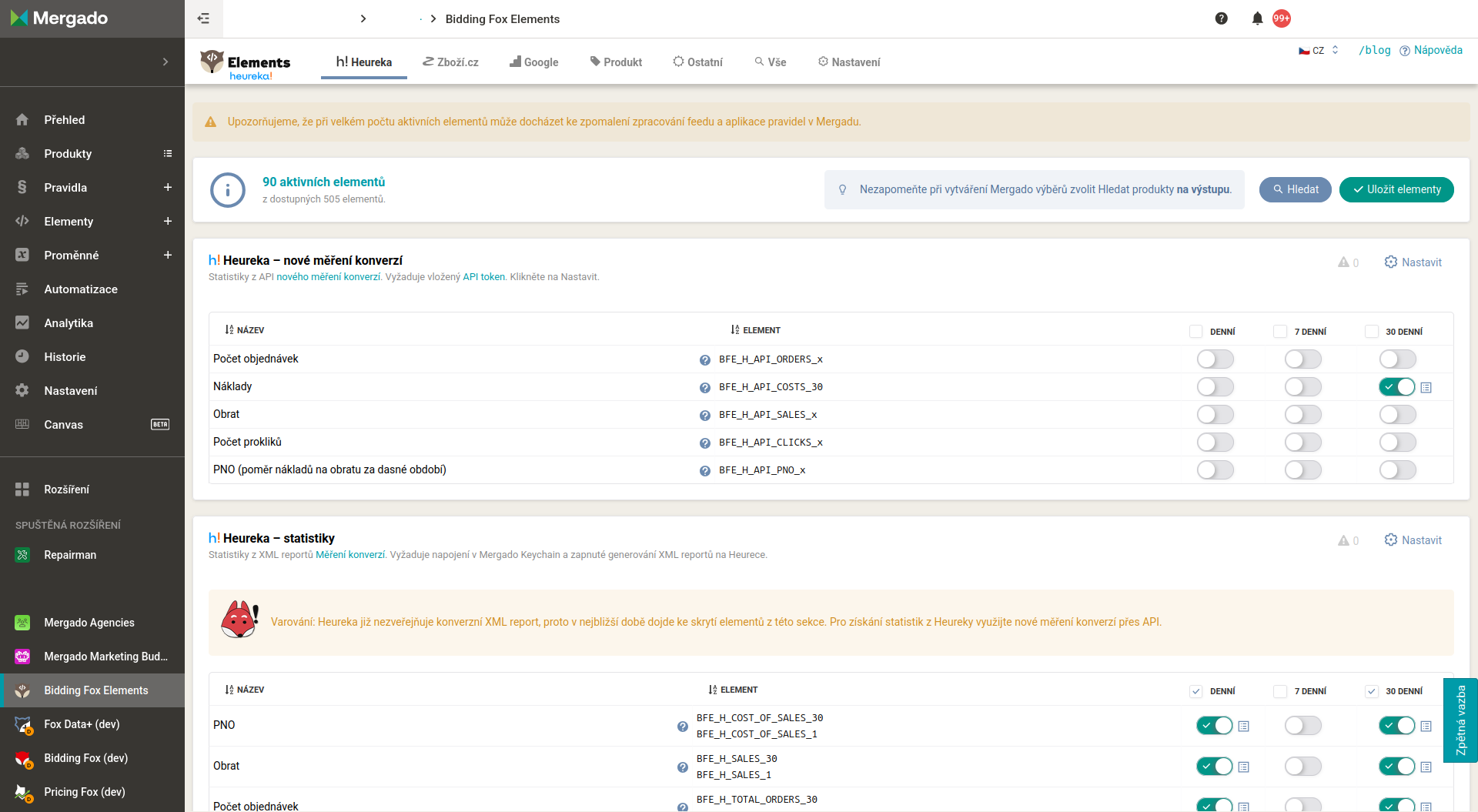
Bidding Fox Elements is a Mergado extension. Once it is turned on, a Bidding Fox Elements rule appears among the rules in Mergado, which ensures the flow of data into the extension and back into Mergado. The extension’s own interface is an element catalog organized by data source. In the top menu you switch between sources: Heureka, Zboží.cz, Google, Product, Other, plus the All tab (all elements at once), Alerts and Settings.
How elements work#
An element is a new data column that Bidding Fox Elements adds to your products (for example a statistic from Heureka, a currency rate or a weather forecast). In the catalog you activate an element, and for parametric elements you choose a specific value (for example a city for weather or a currency pair for rates). You then use the element in Mergado rules, typically to:
- calculate a new value (for example converting a price with a rate
<PRICE_EUR> = [BFE_C_CZK_EUR] * [PRICE]), - tag products with a
custom_labelfor PPC campaigns, - hide unprofitable products from advertising,
- set conditions in Bidding Fox strategies.
⚠️ Bidding Fox Elements elements are hidden by default in the output feed (for compatibility with Facebook, for example). If you need to see an element in the feed, you reveal it with a single click in Mergado on that element’s page.
Shared catalog controls#
The source tabs (Heureka, Zboží.cz, Google, Product, Other) and the All tab all work the same way; they differ only in the set of elements. At the top you see the number of active elements out of the total available and the Search and Save elements buttons. Elements are divided into sections, each with a Configure link and a short description or warning.
- Activating an element: you turn statistics on with switches by period (Daily, 7-day, 30-day), other elements with the Generate switch. After making your selection, save it with the Save elements button.
- Element names start with the
BFE_prefix and continue with a source abbreviation (for exampleBFE_H_Heureka,BFE_Z_Zboží.cz,BFE_GA4_Google Analytics,BFE_P_product,BFE_D_date and time,BFE_W_weather,BFE_C_currency rates). - Period of one day, 7 days or 30 days. Data for 7 and 30 days is calculated as a simple average of the daily statistics.
- Value preview for individual products, so you can see what a specific element returns.
💡 Tip: In Mergado, always build queries for elements over the output, not over the input. Bidding Fox Elements data is only populated after rule application. For that reason, place the Bidding Fox Elements rule in Mergado before the other rules that use its data.
FAQ#
-
Why can’t I see an element in the output feed? Elements are hidden by default for compatibility reasons. You reveal them with a single click in Mergado on that element’s page.
-
I created a query over an element and it is empty. Why? Data is populated only after rule application. Build queries over the output and place the Bidding Fox Elements rule in Mergado above the other rules.
-
Is Bidding Fox Elements per online store or per project? Per project. On the same online store it can run on several projects (for example separately for Google Ads and for Heureka) and then appears multiple times on the Mergado invoice.
-
The element shows 0 on the input and I have a question mark by the value. What now? Values are populated on the output after rule application; on the input the elements show 0. If you see a question mark by the value, click through to the element detail, where you will see the value.
Pages#
Heureka
Elements from Heureka: product statistics, competition, categories and ratings.
Zboží.cz
Elements from Zboží.cz: product statistics, competition and catalog position.
Elements from Google Analytics 4: revenue, transactions, conversions and product traffic.
Product
Elements derived directly from product data: prices, availability, date and calculations.
Other
Elements from other sources: weather, currency rates, date and time.
All
An overview of all available elements across sources in one place.
Alerts
Project monitoring: connections, data synchronization and the application of the Bidding Fox Elements rule.
Settings
Configuring connections to data sources: Google Analytics, Heureka and Zboží.cz.