
🛒 Heureka#
The Heureka tab contains elements with data from the Heureka price-comparison site, divided into several sections. Each section has a Configure link and a short description or warning. You activate statistics with the Daily, 7-day and 30-day switches, and other elements with the Generate switch. The controls are shared across all sources and are described in the introduction to the Interface section.
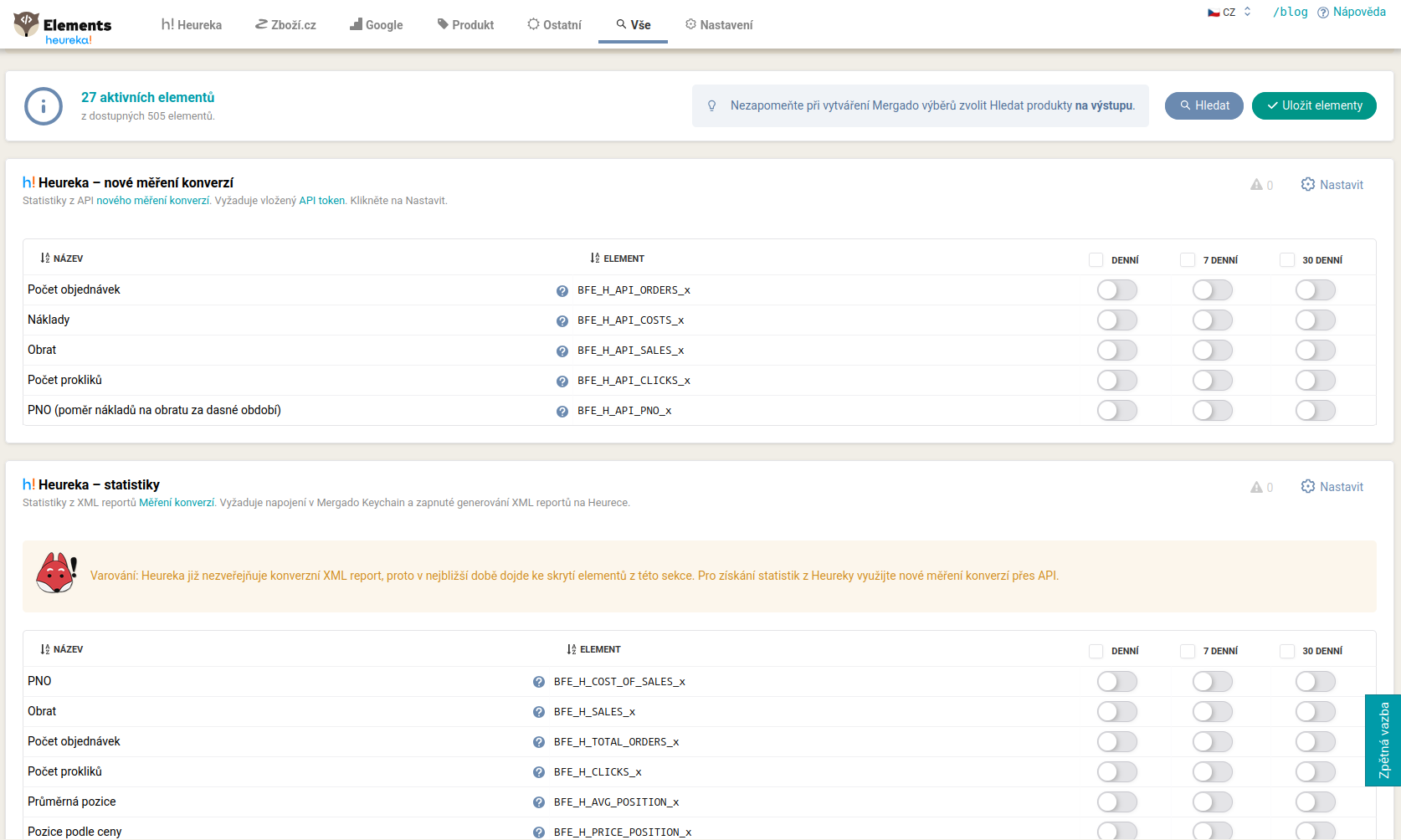
New conversion measurement#
Statistics from the new conversion measurement API. Requires entering an API token. Elements: BFE_H_API_ORDERS_x (orders), BFE_H_API_COSTS_x (costs), BFE_H_API_SALES_x (revenue), BFE_H_API_CLICKS_x (clicks), BFE_H_API_PNO_x (PNO for the given period).
Statistics#
Older statistics from the conversion XML report (for example BFE_H_SALES_x, BFE_H_CLICKS_x, BFE_H_TOTAL_ORDERS_x, BFE_H_COST_OF_SALES_x, BFE_H_AVG_POSITION_x, BFE_H_PRICE_POSITION_x, BFE_H_AVG_CPC_x, BFE_H_TOTAL_COST_x).
⚠️ Heureka no longer publishes the conversion XML report, so the elements in this section will be hidden in the near future. For statistics, use the new conversion measurement via API (the
BFE_H_API_elements).
Product information#
Data from the Sortiment report. Requires a connection in Mergado Keychain. This includes, for example, the Heureka category (BFE_H_CATEGORY), the current cost per click (BFE_H_CURRENT_CPC), the minimum category CPC (BFE_H_MIN_CPC), the ranking of the lowest and highest prices on the card (BFE_H_MIN_PRICE, BFE_H_MIN_PRICE2 up to BFE_H_MAX_PRICE10), popularity (BFE_H_POPULARITY) and the number of online stores in the detail (BFE_H_SHOPS_COUNT).
Product card#
Details from the product card from the Heureka API, with the BFE_S_H_ prefix. Requires the Bidding Fox or Pricing Fox extension active on the project. This includes, for example, the bidding position (BFE_S_H_BIDDED_POSITION), the position by price (BFE_S_H_PRICE_POSITION), the number of online stores on the card (BFE_S_H_SHOPS_COUNT), the lowest and highest price on the card (BFE_S_H_MIN_PRICE, BFE_S_H_MAX_PRICE), whether the TOP offer has a cart (BFE_S_H_TOP_HAS_CART) and the product rating (BFE_S_H_PRODUCT_RATING).
Product rating#
Product rating and reviews: the count and average of ratings (BFE_H_PRODUCT_REVIEWS_COUNT, BFE_H_PRODUCT_RATING_AVG), the minimum and maximum (BFE_H_PRODUCT_RATING_MIN, BFE_H_PRODUCT_RATING_MAX) and the recommendation ratio (BFE_H_PRODUCT_RECOMMENDS_YES, BFE_H_PRODUCT_RECOMMENDS_NO).
Unmatched products and products awaiting listing#
Pairing suggestions you use to fix the product: the suggested name, category, EAN, price range and URL on Heureka (BFE_H_UNPAIRED_SUGGESTED_…, or BFE_H_PENDING_SUGGESTED_… respectively).
FAQ#
-
Heureka statistics are not being populated with new data. Heureka has switched to the new conversion measurement. Use the elements with the
BFE_H_API_prefix; the old elements in the “Statistics” section are not populated with new data. -
The product card elements (
**BFE_S_H\_**) are empty. They work only when you have Bidding Fox or Pricing Fox active on the project. They supply data from product cards via the Heureka API. -
The “Product information” section returns nothing. It requires a Heureka connection in Mergado Keychain.
-
What do the Daily, 7-day and 30-day switches mean? They activate the element with statistics for the given period. Values for 7 and 30 days are calculated as a simple sum or average of the daily statistics.
-
How do I recognize unmatched products? A matched product has the Heureka URL filled in and is in the Sortiment report. Create a filter over the output where
BFE_H_HEUREKA_URLis empty, and you will list the unmatched products.