
Organization – General#
The General page is the hub for organization settings. It brings together the list of members, renaming the organization, and an overview of credit usage in one place.
The Organization item in the left panel is visible to the Owner and Admin roles. Below it are the General, Credentials (Organization – Credentials), Files (Organization – Files), and Webhooks (Organization – Webhooks) pages.
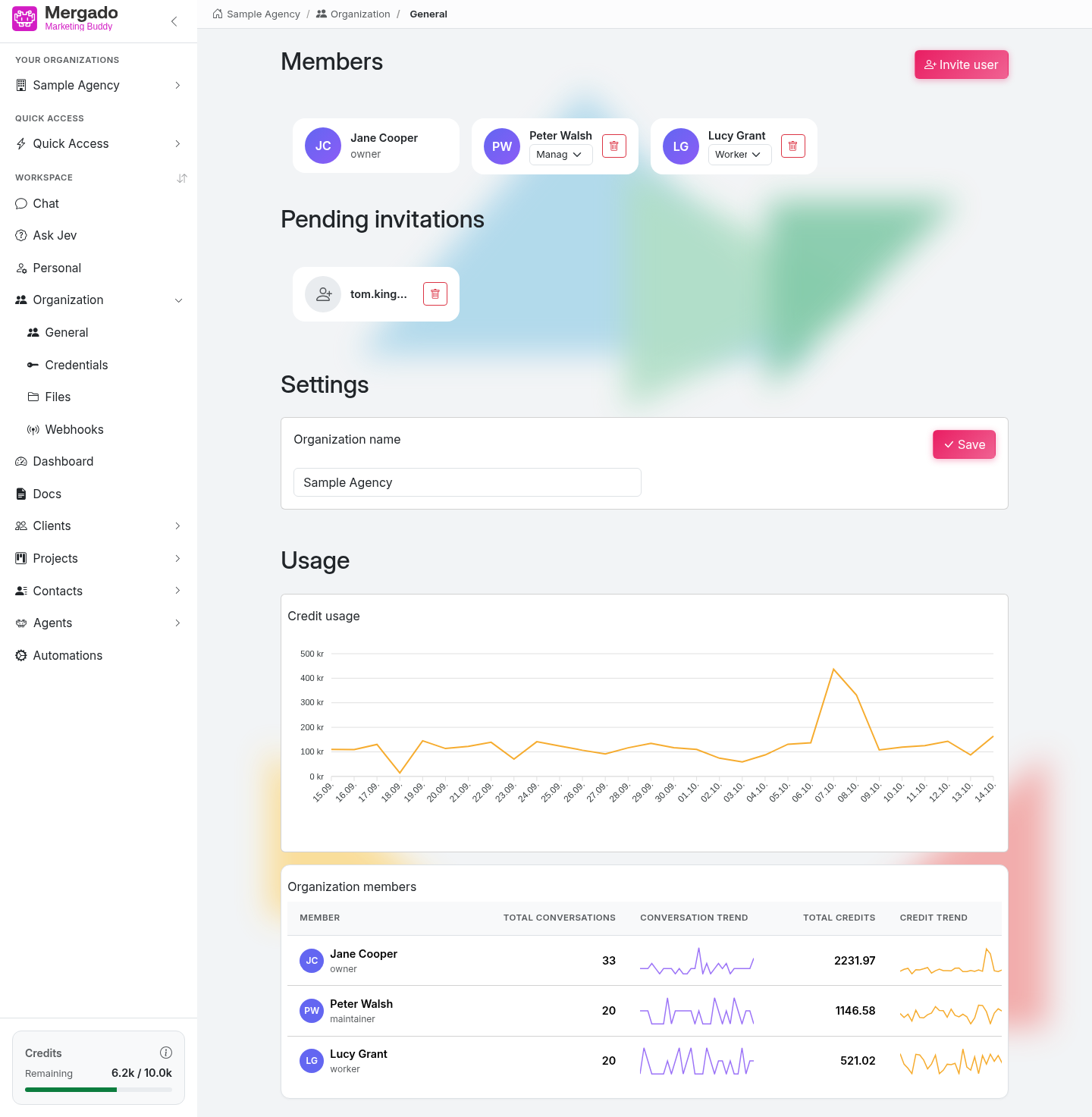
Page layout#
The page has three parts, one below the other.
1. Members#
In this section, you manage the people in the organization: whom to invite and what role they should have.
Section layout
- The Members heading and the Invite user button.
- Member cards with an avatar, name, and role.
- The Pending invitations part – invitations that have been sent but not yet accepted.
Inviting a member
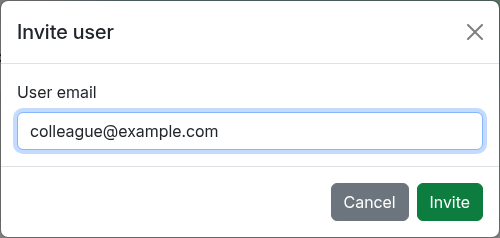
The Invite user button opens a dialog with the User email field. Once you send it, the invitation appears in Pending invitations; the invited person sees it in their Buddy in the organization switcher and can accept or decline it. The invitation is not sent by email. Cancel an unaccepted invitation with the trash icon.
You can only invite someone who has already signed in to Marketing Buddy at least once with their Mergado account – otherwise the application reports that a user with that email does not exist. A new member gets the Member role.
Roles
| Role | Permissions |
|---|---|
| Owner | Full management of the organization; the only one who can change the roles of other members |
| Admin | Management of the organization – inviting and removing members, renaming, credentials, webhooks, copying chats to another organization |
| Member | Everyday work – chat, agents, automations, documents, CRM |
The owner changes the role of other members by selecting it in the drop-down list on the member’s card; the change is saved immediately. The owner is the person who created the organization.
Removing a member
The trash button on a member’s card removes them from the organization; the application asks for confirmation first. You cannot remove yourself. Content the member created (documents, agents, automations) remains in the organization.
What you can do here
- Invite a colleague to the organization and track the status of the invitation.
- Change a member’s role (owner only).
- Remove a member from the organization.
2. Settings#
In this section, you change the organization name. You will find the Organization name field and the Save button here. The name must be 3 to 48 characters long and changes immediately for all members. This section is visible to the Owner and Admin roles.
3. Usage#
In this section, you can see how intensively the organization uses Marketing Buddy and how many credits it consumes.
Section layout
- Credit usage – a chart of credits consumed per day over the last 30 days.
- Organization members – a table by member with the columns Member, Total conversations, Conversation trend, Total credits, and Credit trend. The trend columns are small charts showing the development over the same period.
The statistics also include conversations started in the background by agents, automations, and webhooks.
How to read the numbers
- A credit is the unit of AI consumption. One credit equals CZK 0.10.
- Consumption grows with the length of the conversation, a more powerful model, and the number of tools called.
- Spikes in the chart usually mean bulk processing – for example, an automation that went through a large volume of data.
You can see the current balance at any time in the Credits indicator in the left panel.
What you can do here
- Find out how many conversations the organization has and how this develops over time.
- See who consumes the most credits.
- Spot an unexpected spike in consumption and find its cause.
FAQ#
Who can rename the organization? The Owner and the Admin.
How do I create another organization? In the organization switcher in the left panel, with the New organization button.
The invitation cannot be sent – why? The email you enter must match an account that has already signed in to Marketing Buddy. Ask your colleague to sign in first, then send the invitation again.
Can I have more than one owner? No, the owner is the person who created the organization, and the owner role cannot be transferred. Give others the Admin role, which covers everyday management.
What happens to the chats of a removed member? The member loses access to the organization. Content they created in the organization remains there.
Why do I have consumption on days when I did nothing? Most likely, a scheduled agent or automation ran. You can see the schedule and the run history on the Dashboard page.
How can I reduce consumption? Use a lighter model for simple tasks, enable only the extensions you need, and do not give agents more tools than they really need. For recurring tasks with a fixed process, use an automation.
What happens when I run out of credits? The AI stops responding and a message about insufficient credits appears in the chat until you top up your credits. The indicator in the left panel turns red when the balance falls below 15 %.