
Ask Jev#
Ask Jev is a page for quickly assessing a text. Jev does not chat, Jev decides: you give it a text and questions with predefined answers, and in a fraction of a second it tells you how confident it is about each answer. It is useful, for example, for sorting customer emails, reviews, or product descriptions.
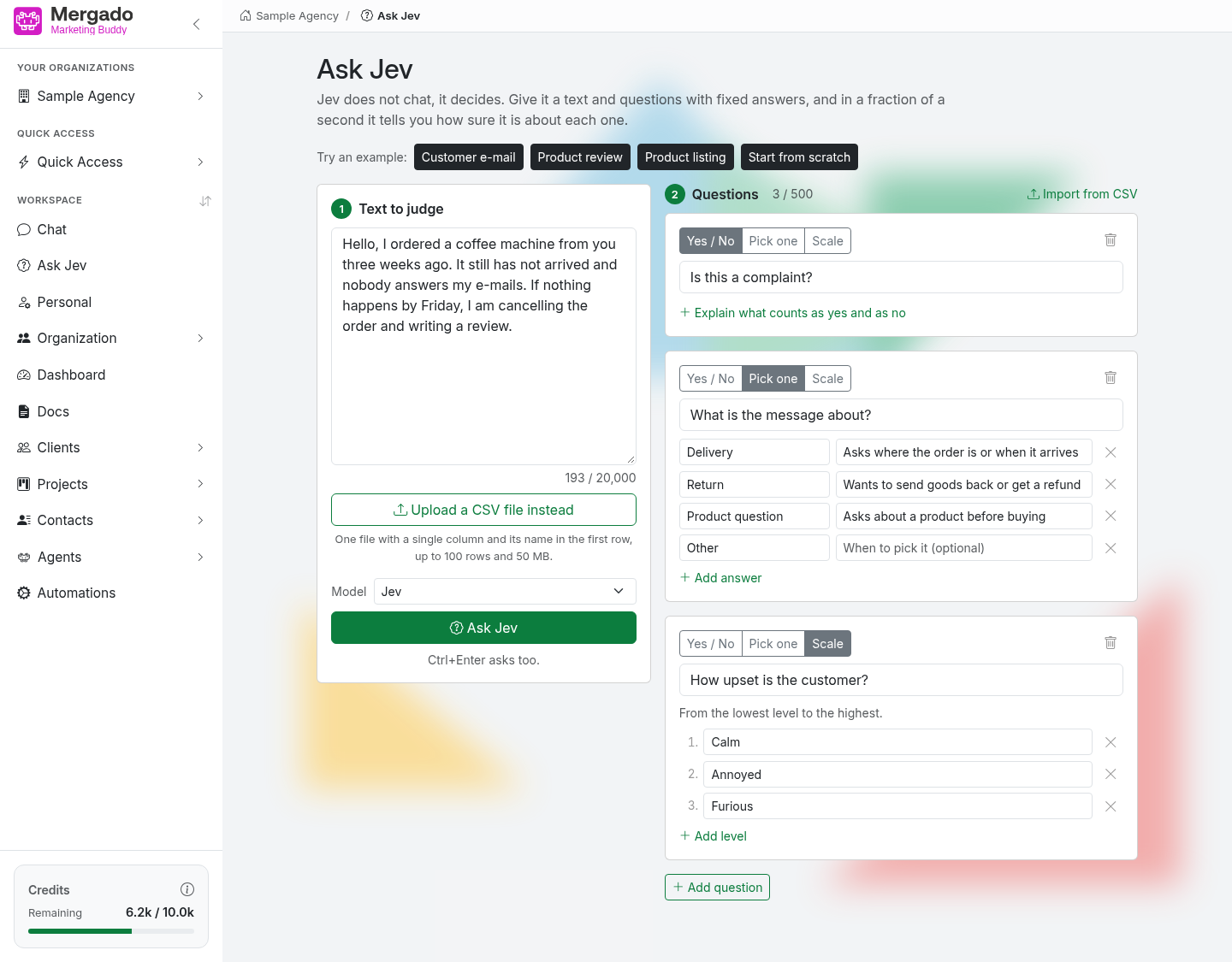
Page layout#
- Try an example – buttons with ready-made examples (Customer email, Product review, Product page) and Start from scratch, which clears the page.
- 1 Text to assess – a field for the text (up to 20,000 characters), the Model selection, and the send button.
- 2 Questions – a list of questions Jev should answer, plus the Import from CSV and Add question buttons.
Questions#
Each question has one of three types:
- Yes / No – Jev returns how confident it is about the answer “yes”. Use the Specify what counts as yes and what as no link to describe both answers.
- Multiple choice – 2 to 12 answers, and for each one you can describe when to choose it. Jev shows the probability of each option and highlights the most likely one.
- Scale – 2 to 12 levels from lowest to highest. In addition to the probabilities of the levels, it also shows the average level.
If Jev is not confident about an answer, it lets you know. If you change the text or questions after getting an answer, the page shows that the result no longer matches, and you can ask again.
You can also load questions from a file with the Import from CSV button – the dialog describes the required columns and offers a template for download.
Model#
- Jev (default) – handles up to 500 questions at once.
- Clef and Clef Flash – up to 64 questions; they can also assess an image. When you select one of them, Add image appears (PNG or JPEG; you can also paste the image from the clipboard). With an image, the text is optional.
Send the query with the button (e.g. Ask Jev) or with Ctrl+Enter.
Assessing a CSV file#
Instead of a single text, you can use the Upload a CSV file instead of text button to upload a file with one column (the column name in the first row, up to 100 rows). Jev answers the questions for each row and adds the answers as new columns – for each question, the answer and the confidence as a percentage. You can follow the progress on the page, stop and restart the run, and download the result with the Download CSV button. Keep the page open until Jev has finished.
What you can do here#
- Quickly sort a text according to your own questions.
- Rate a text on a scale (e.g. how dissatisfied a customer is).
- Run a whole CSV file through your questions and download the result.
- Assess an image (with the Clef models).
FAQ#
Does Ask Jev consume the organization’s credits? No, queries do not count towards the organization’s credits. To make the service available to everyone, the number of queries and rows per minute is limited – if you exceed the limit, wait a moment and try again.
Is my text stored anywhere? The text, questions, and files are not stored on the server. Only your browser remembers your work in progress, so you can pick up where you left off when you return to the page.
How is it different from the chat? The chat responds with free text and can work with tools. Jev only chooses from the answers you give it – but it does so instantly and for hundreds of rows at once.