
🩺 Diagnostics#
Diagnostics start filling up as soon as you have strategies set up and Bidding Fox downloads data for matched products. They show what is preventing bidding, what to watch out for and where there is room for improvement.
The page is divided into the Overview, Problems, Warnings, Recommendations, Validators and Custom tabs, each with the number of items in parentheses. The Overview tab summarizes the most important figures (input products, matched, unmatched, compliant and non-compliant with the settings, and others) and via Edit layout you can arrange the blocks. For each block you can display data over time, search for the affected products (Search) or export them to CSV (Export).
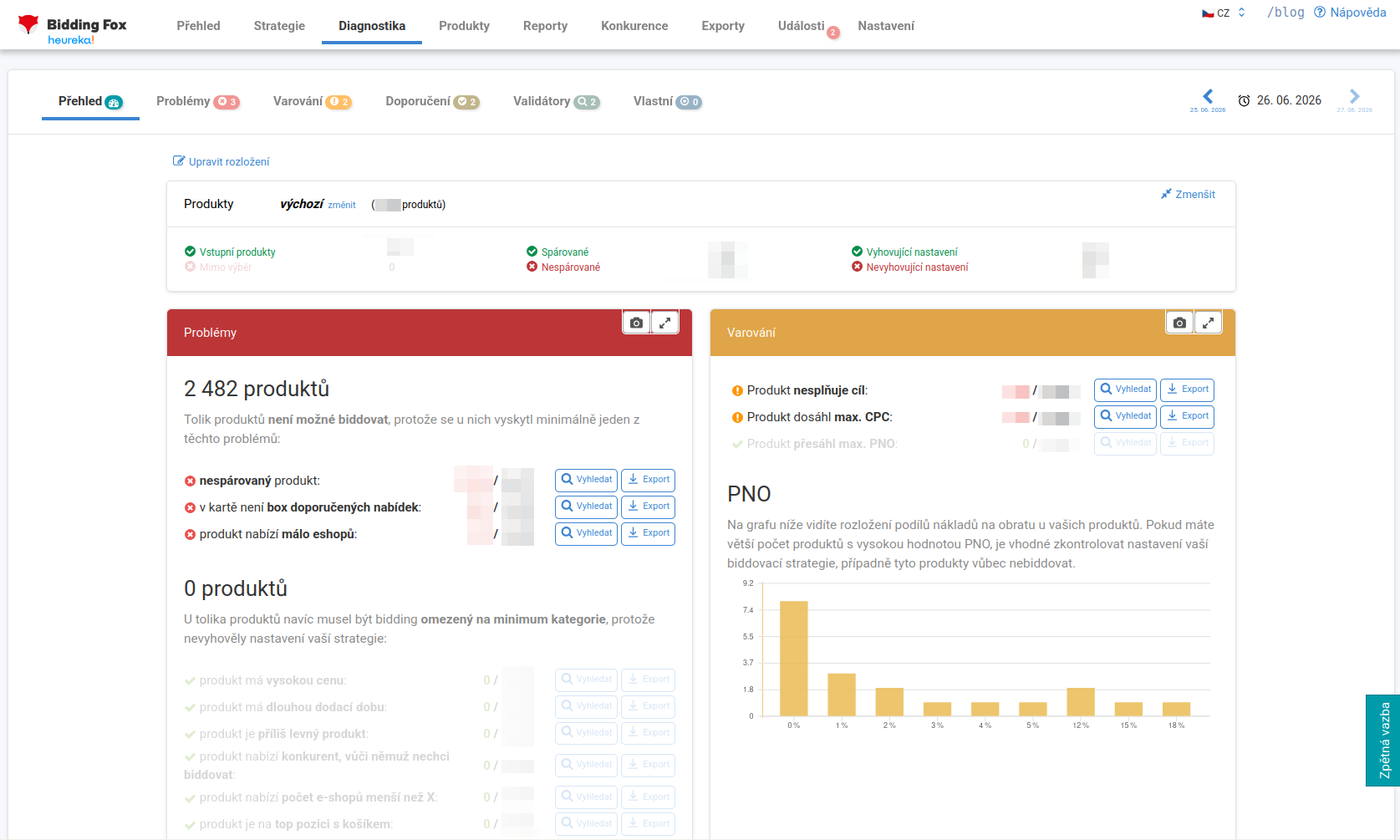
Problems#
Things that prevent products from being bid on. They are divided into two parts. The first prevents bidding entirely:
-
Unmatched products: they cannot be bid on, there is nothing to compare against in the card. The solution is to rematch the products into the correct cards (by editing the name, category or parameters in the feed).
-
Card without a recommended offers box: either you are alone in the card, or Heureka did not launch the box for some reason. There is usually nothing to be done about this.
-
Product offered by few online stores.
The second part is products for which bidding had to be limited to the category minimum because they did not comply with the strategy setting:
-
the product has a high price,
-
the product has a long delivery time,
-
the product is too cheap,
-
the product is offered by a competitor you do not want to bid against,
-
the product is offered by a number of online stores smaller than X,
-
the product is in the top position with the cart.
Warnings#
Things that do not prevent bidding, but are good to know about:
-
Product does not meet the goal: it is not at the target position. Note: this does not mean it is not in bidding, it may just be at a different position. We recommend combining it with the outside bidding filter on the Products page so you can see which products really are not in bidding.
-
Product reached the maximum CPC: the autobidder has no room left to bid higher. If you want to be higher, you can manually increase the maximum CPC for a specific product.
-
Product exceeded the maximum PNO (cost/revenue ratio): it dropped out of bidding due to costs.
-
CPC is lower than the category minimum: the calculated cost per click is below the minimum the comparison site allows for the given category. Check the maximum CPC in the strategies the products belong to and raise it if needed.
-
CPC higher than half the product price: a warning about a risky cost per click compared to the price of the product. Bidding still runs, it is just worth checking whether such a high CPC is really what you want.
-
Bid higher than the product price: the cost per click set exceeds the selling price of the product. Check the price levels of the products in that strategy.
There is also a distribution chart of the PNO, where you see the share of costs in revenue for products. A large number of products with a high PNO is a signal to check the strategy.
Recommendations and validators#
Recommendations help you find room for optimization, for example a bubble chart (popularity, clicks, orders) or availability breakpoint (watch out for the difference between 0 = in stock and 1 = within three days in the feed, which can unnecessarily lower performance).
Validators are “smarter” recommendations. They point out, for example, products that were recently rematched into a different card, dropped out of bidding, or conversely are in bidding but have no performance.
Custom diagnostics and alerts#
The Custom tab lets you create diagnostics for your own specific cases, based on a saved filter from Products or the number of products in a specific strategy.
For problems, warnings and validators alike you can set an alert: when the number of products rises or falls (even by a chosen percentage), an email is sent to the addresses entered in Settings and the event is written into the charts and to the Events page.
💡 Example: for the “TOP products” strategy you have it watch for when the number of products drops by more than 50%. You immediately know that your key products are dropping out and do not have to wait for the monthly report.
FAQ#
-
Does “Product does not meet the goal” mean I am not in bidding? No. It only means that the product is not at the target position, it may well be in bidding. For products outside bidding, combine this diagnostic with the “outside bidding” filter on the Products page.
-
What should I do with unmatched products? Rematch them into the correct cards by editing the name, category or parameters in the feed. Unmatched products cannot be bid on.
-
A product reached the maximum CPC, what now? The autobidder can no longer bid higher. If you want to be higher, increase the product’s maximum CPC manually, or leave it be.
-
Where do I find products with an excessive cost per click? On the Warnings tab, in the CPC higher than half the product price and Bid higher than the product price diagnostics. The Search button takes you straight to Products with the matching filter, Export downloads the products into CSV.