
Google Merchant Center#
Google knows the prices of all stores that advertise in Google Shopping. That’s why Pricing Fox uses the Google Merchant Center (GMC) connection to get two prices for each product, calculated directly by Google: the benchmark price and the suggested price. You immediately see whether you’re more expensive than the market on Google, or unnecessarily cheap, and you can adjust your prices manually or with a rule.
The GMC connection is included in the Pricing Fox plan at no extra charge.
Benchmark price and suggested price#
| Benchmark price | Suggested price | |
|---|---|---|
| What it shows | The average price other stores in Google Shopping charge for the same product | The price at which, according to Google, your product performs best in ads |
| How Google calculates it | From the prices of all stores offering a product with the same EAN (GTIN), in ads and free listings | It simulates different prices on your ad performance over the last 7 days and takes into account how sensitive customers are to price |
| When Google doesn’t calculate it | The product has no valid EAN, or no one else sells it on Google | You don’t measure purchase conversions in Merchant Center, or Google doesn’t see a significant opportunity for improvement |
| What it’s good for | Comparing yourself with the market: are you more expensive or cheaper than the others? | Fine-tuning the price for more clicks and orders from Google Ads |
| What to keep in mind | It’s the market average, not the price of the cheapest competitor | It’s optimized for ad performance, not for your margin. Google itself describes it as guidance, not a guarantee |
The suggested price can be lower than your purchase price. When you use it in a rule, always set a minimum margin or markup. Pricing Fox then won’t let the price go below that limit.
You can also see both prices in Merchant Center, in the Analytics → Prices section. Pricing Fox downloads them for you and puts them right next to your products, rules and diagnostics.
How to connect GMC#
You don’t enter any keys in Pricing Fox. Pricing Fox uses the Google Merchant Center connection you already have in Mergado.
- Connect Google Merchant Center in Mergado through Mergado Keychain. If you already have it connected, you’re all set.
- Pricing Fox takes over the connection on its own when the project syncs. In the Connections section you see the connection status and account ID for Google Merchant Center. You manage the connection with the “Manage your connection in Mergado Keychain.” button.
- Optionally, set the currency in the “Convert prices to (currency)” field. If the prices in GMC are in a different currency than the prices in your online store, Pricing Fox converts them at the current ECB exchange rate. You can choose CZK, EUR, PLN, HUF, USD, GBP and RON. By default, prices aren’t converted.
- Optionally, choose a pairing element. Fill it in only if the products in GMC use different IDs than your default pairing element. The element must exist in Mergado and be filled in before the Pricing Fox rule.
Pricing Fox continuously checks that data from GMC keeps coming in. When the connection stops working, the data is older than 48 hours or no product can be paired, it alerts you in Alerts.
Where you see the prices from Google#
- Products: the Google Merchant Center column group with the Suggested price and Benchmark price columns. You can sort them, filter them by range and export them. The Diagnostics filter quickly finds, for example, products you sell above the benchmark price, or products with a purchase price above the suggested price.
- Product detail: both prices clearly side by side.
- Diagnostics: the Google price recommendations block divides products into three groups:
| Group | What it means | What to do |
|---|---|---|
| Room for price increase | You sell for less than the suggested price | Consider raising the price. According to Google, you won’t lose performance and your margin will grow |
| Margin risk | The purchase price is higher than the suggested price | Selling at the suggested price would mean a loss. Don’t use the suggested price for these products without a margin limit |
| Above benchmark | You sell for more than the benchmark price | You may be losing competitiveness on Google. Review the price or the rule |
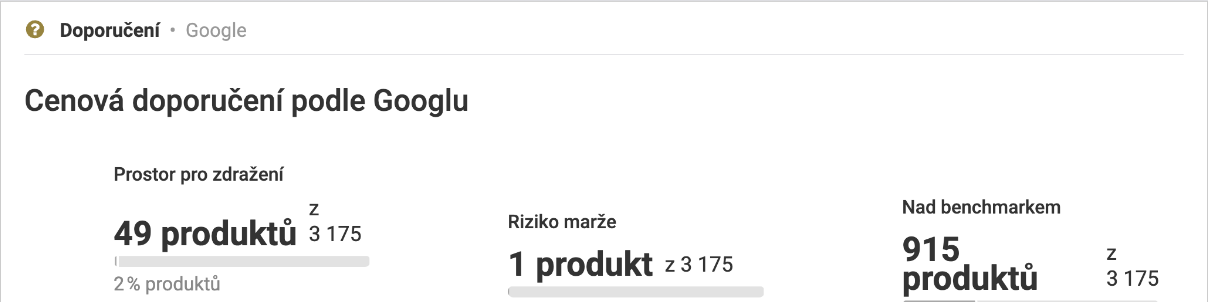
The Google price recommendations block shows how many of your products fall into each group.
Rules with the GMC source#
In a rule, choose GMC as the reference price source and select Suggested price or Benchmark price in the Price type field. You can then deviate from the selected price in CZK or in %. Minimum and maximum price, margin and rounding work the same as with the other sources (see Rule setting options).
For a quick start, the rule editor and the wizard offer two quick actions:
- Copy the suggested price from Google: the price is set exactly to the suggested price.
- Copy the benchmark price from Google: the price is set exactly to the benchmark price.
When Google hasn’t calculated the selected price for a product, the rule skips the product and leaves the price unchanged. The product can then continue to the next rule.
Tips for using prices from Google#
- Fallback rule for products without comparison sites: set products that have no data from Heureka or Zboží.cz to, for example, 2 % below the benchmark price, with a minimum margin check.
- Google Ads performance test: apply the suggested price only to a selected group of products, always with a margin limit, and compare the results in Reports.
- Candidates for a price increase: the Diagnostics filter “Sales price < suggested” shows you products that, according to Google, you sell unnecessarily cheaply.
Frequently asked questions#
Why do some products have no benchmark price? Google calculates it only for products with a valid EAN that other stores also sell on Google. Add the EAN to your feed if it’s missing.
Why do some products have no suggested price? Google shows it only for products where it predicts a significant improvement in performance, and only if you measure purchase conversions in Merchant Center. Suggestions don’t appear for products with automated discounts from Google.
Is the suggested price the same as the manufacturer’s recommended price? No. Google calculates the suggested price based on the performance of your ads. It has nothing to do with the manufacturer’s recommended price.
Does the suggested price protect my margin? No, Google optimizes it for clicks and orders. You protect your margin with the limits in the rule.
Do I need Google Ads campaigns for GMC? The benchmark price is based on the prices of other stores, so it doesn’t need ad data. The suggested price is based on the performance of your products in ads, and without them Google usually doesn’t calculate it.
Do I have to enter anything in Pricing Fox? No. Pricing Fox takes over the connection from Mergado. You can only set the conversion currency and the pairing element.
Related#
Connections · Rule setting options · Products · Diagnostics · Alerts · Kaufland