Diagnostics#
The Diagnostics page offers a summary overview of the checks that Pricing Fox automatically performs on your project. It helps you quickly reveal problems that prevent correct repricing, alerts you to risky states, and shows opportunities where there’s room for improvement. The individual diagnostics cover pricing, product pairing on price comparison sites, and competitor monitoring.
1. Project health#
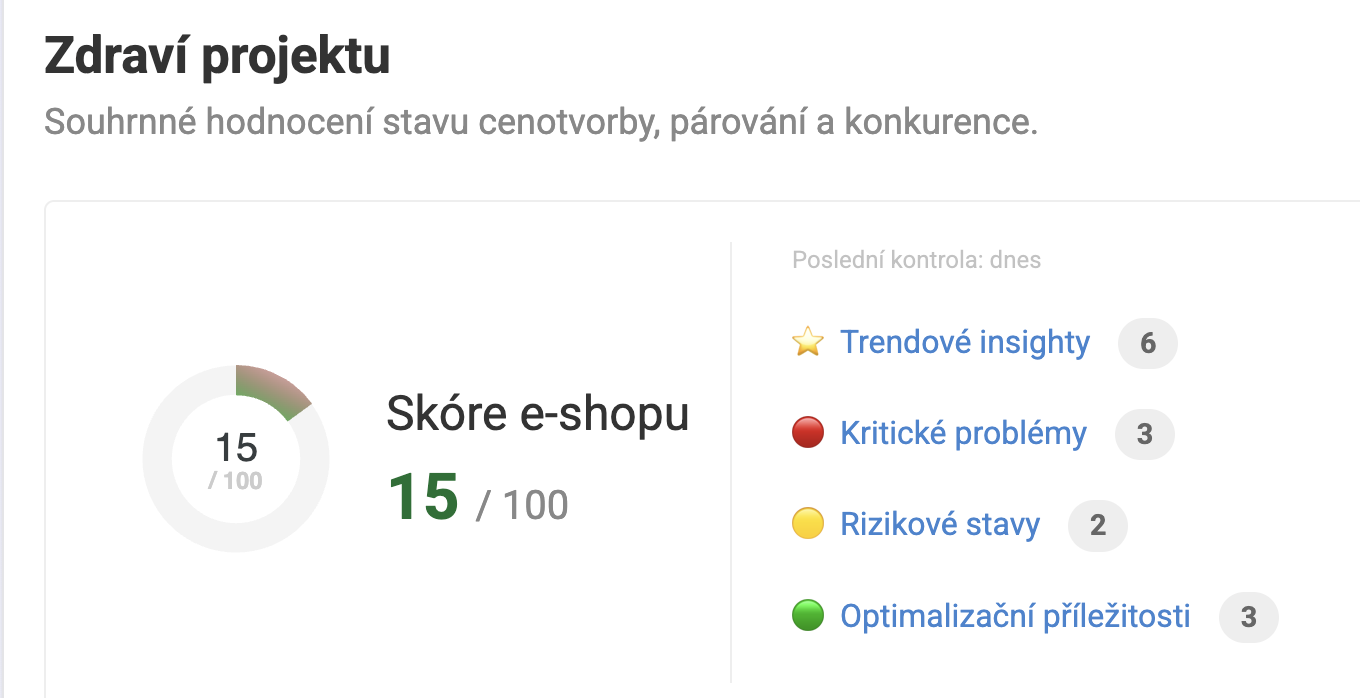
At the top of the page you’ll find the summary Project health – a numerical score on a scale of 0–100, weighted based on the number of products affected by the individual diagnostic messages. The score is shown as a pie chart and serves as a quick indicator of the project’s overall state.
Next to the chart you see an overview of the message counts by severity:
-
⭐ Trend insights – time-oriented checks (new and dropped products, price deviations, measurement outages)
-
🔴 Critical problems – serious states that directly limit the functionality of repricing
-
🟡 Risky states – alerts about situations that may lead to problems
-
🟢 Optimization opportunities – recommendations on where there’s room to improve performance
Clicking the individual categories takes you to the corresponding section of the page.

2. Trend insights#
Trend insights are diagnostics that, unlike the other categories, add a timeline. They track the development of the project over time and alert you to deviations or trends that might otherwise go unnoticed.
What trend insights track:
-
New and dropped products – products that have newly appeared in the feed or, conversely, disappeared. Helps reveal unexpected changes in the assortment.
-
Price deviations – products whose price significantly departs from their historical development (a one-off jump or drop).
-
Price spiral – products with a gradual but sustained price change that may signal an unhealthy price race with the competition.
-
Project watchdog – alerts you to outages in the measurement or processing of data. If, for example, the feed stops coming in or data can’t be downloaded from a price comparison site, the Project watchdog will alert you to it.
3. Critical problems#
Critical problems are messages with a red marking that directly limit the functioning of repricing or the visibility of products on price comparison sites. It’s advisable to address them as a priority.
Examples of critical problems:
-
Unpaired products on Heureka / Zboží.cz – products aren’t assigned to product cards on the price comparison site. They can’t be price-compared or have their position optimized.
-
No competition on the card – the product is paired on the price comparison site, but it’s the only seller on the card. Repricing by position or competitor can’t be used here. It may signal incorrect pairing or a unique assortment.
Each message shows:
-
the name and source of the diagnostic (e.g. Heureka, Zboží.cz)
-
the number of affected products and their share of the total assortment
-
a brief explanation of why it matters
-
a Detail button to go to a filtered list of the affected products
4. Risky states#
Risky states (yellow marking) are situations that don’t yet block repricing but may lead to problems or less optimal results. We recommend monitoring and addressing them on an ongoing basis.
These are typically states such as products with missing data, unusual price situations, or partial connection issues that don’t yet manifest as a critical error.
5. Optimization opportunities#
Optimization opportunities (green marking) show situations where the project’s functioning isn’t technically wrong, but there’s room to improve the performance or accuracy of repricing.
Examples may include products where Pricing Fox has data that isn’t fully used in the configured rules, or an assortment where a small change can achieve a better competitive position.
6. Google price recommendations#
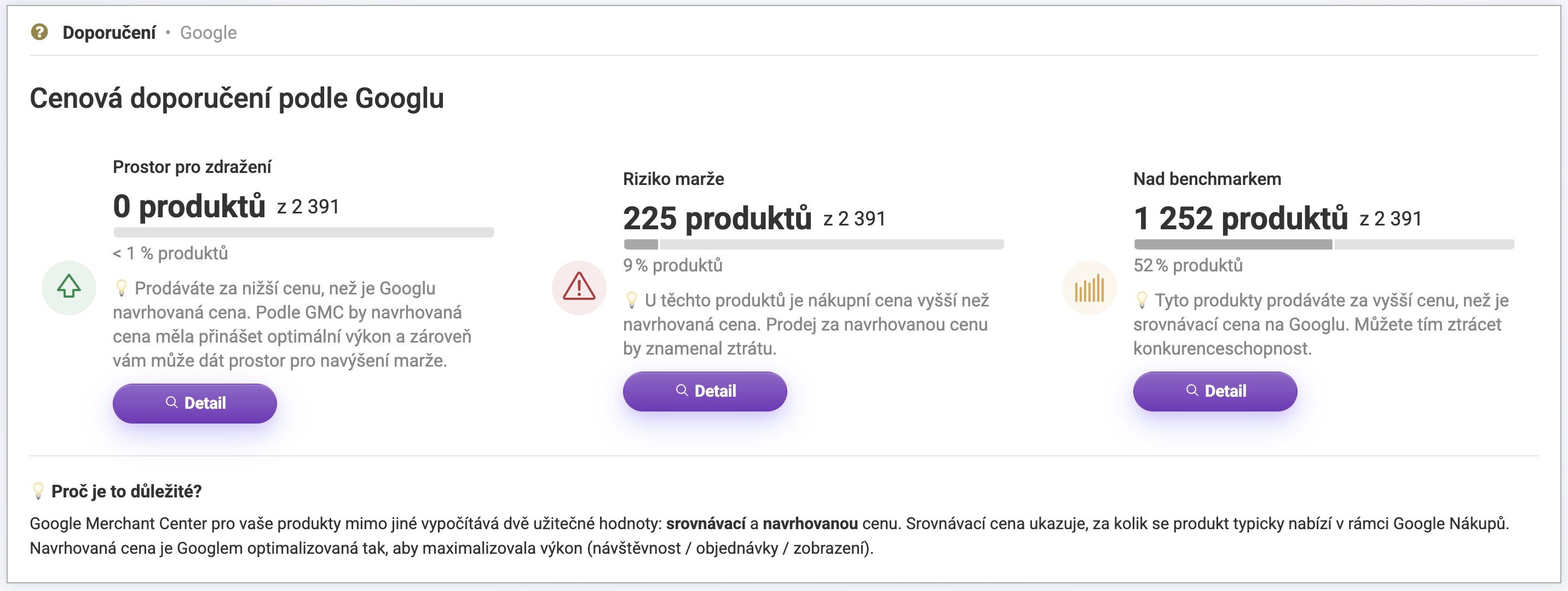
If you have an active connection to Google Merchant Center, Pricing Fox displays a section with price recommendations. Google Merchant Center calculates two useful values for your products:
-
Benchmark price – how much the product is typically offered for within Google Shopping
-
Suggested price – a price optimized by Google with the aim of maximizing performance (traffic, orders, impressions)
Based on a comparison of your prices with these values, Pricing Fox divides products into three categories:
| Category | What it means |
|---|---|
| Room to increase | You’re selling at a lower price than the one Google suggests. According to GMC the suggested price should bring optimal performance – and it also gives you room to increase your margin. |
| Margin risk | The product’s purchase price is higher than the suggested price. Selling at the suggested price would mean a loss. |
| Above benchmark | You’re selling at a higher price than the benchmark price on Google. This may reduce competitiveness in Google Shopping. |
For each category you see the number of affected products and a Detail button to go to their list.

We recommend checking Diagnostics regularly – especially after larger changes in the assortment, after adjusting rules, or after adding a new connection. Some of the diagnostics (Heureka) are also available for Zboží.cz, so they cover both main price comparison sites at once.
You’ll also find a more detailed description of the original diagnostics in the article Diagnostics in Pricing Fox on the Pricing Fox blog.
FAQ#
How often are the diagnostics updated? Most diagnostics are recalculated during each processing of the project’s data – typically several times a day. Trend insights work with a time series and are updated at a longer interval.
What should I do when I have a critical problem? Click the Detail button next to the given message – you’ll get to a filtered list of the affected products. Each diagnostic also has an explanation of why the problem matters and how to solve it. If you’re unsure, contact support at podpora@pricing-fox.cz.
What exactly does the online store score mean? The score of 0–100 is a weighted average calculated from the number of products affected by the individual diagnostic messages and their severity. It doesn’t serve as an absolute assessment of quality – it’s an indicative measure of how many products currently have a diagnostic message and how serious they are.
Why don’t I see the Google price recommendations section? This section is shown only when there’s an active connection to Google Merchant Center. If you don’t have the connection or GMC doesn’t send data about suggested prices, the section won’t appear.
Are the diagnostics available for Zboží.cz too? Yes. A number of diagnostics that were originally available only for Heureka (for example unpaired products or matching prices on a card) are now available for Zboží.cz as well.