
Connecting Orders to Upgates with Mergado Marketplaces#
In the Mergado Marketplaces extension, you can use order management via Upgates. If you run an e-shop on Upgates and sell on Allegro or Kaufland, you can now manage your orders directly in your e-shop administration. Below you will find the steps to set up order synchronization with Upgates.
How to activate the plugin in Upgates?#
The first step is to activate our official plugin in your Upgates administration. In Upgates, go to the Plugins > Plugin List section and search for Mergado Marketplaces. After clicking Activate, you will see a notification with an overview of all the permissions our plugin needs for order synchronization. Click Confirm.
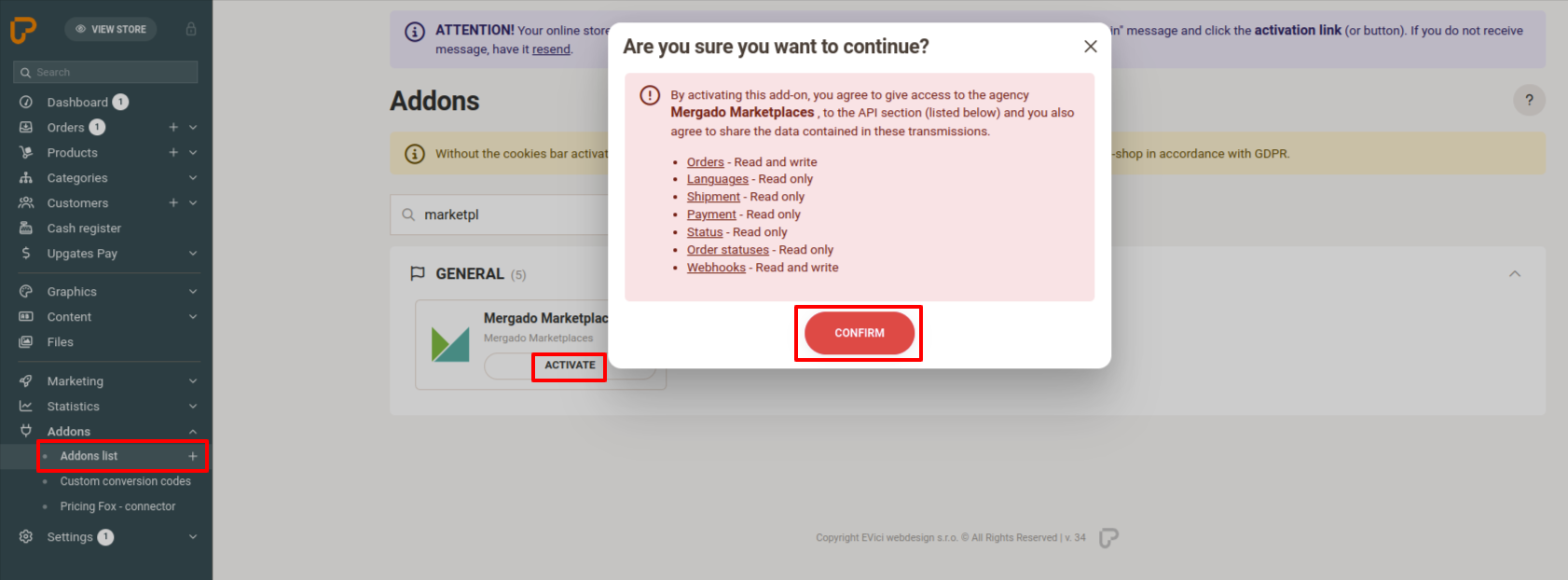
🔗 Link to the Mergado Marketplaces plugin: https://doplnky.upgates.cz/detail/mergado-marketplaces
How to create a connection in Mergado Marketplaces?#
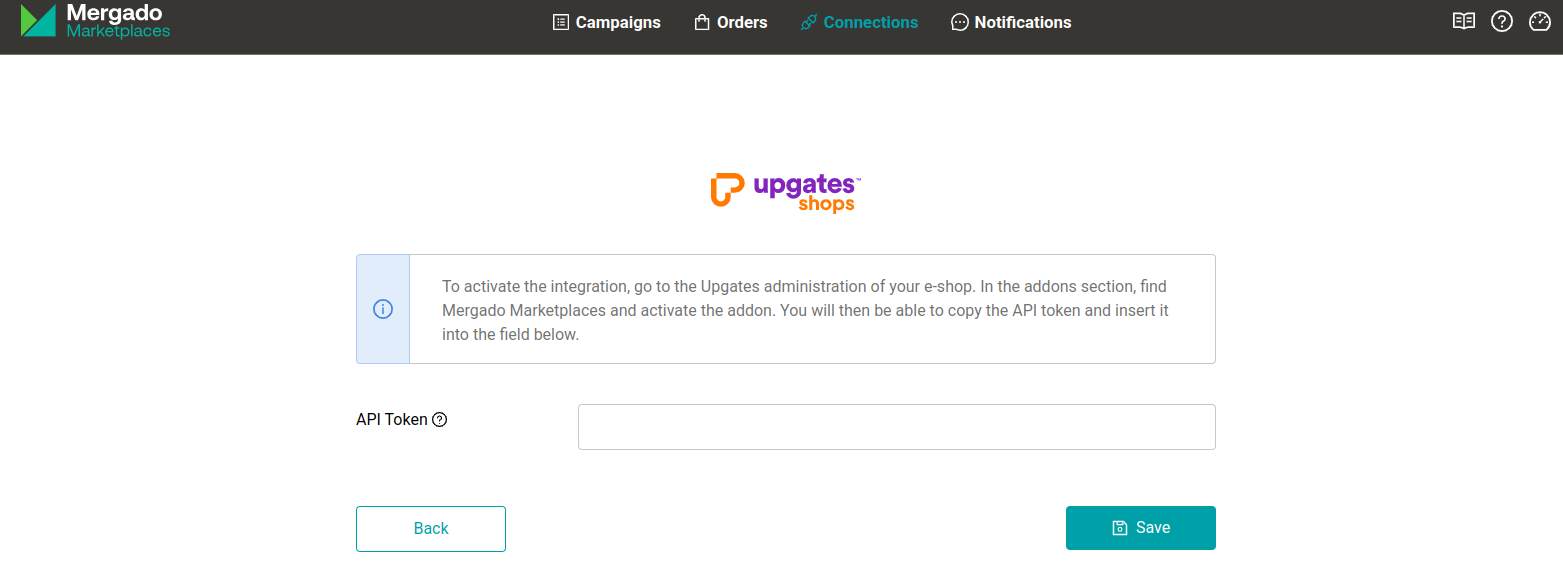
After activating the plugin in Upgates, you will see the next steps directly in Upgates. It is important to copy the API token, which you will find at the bottom of the page. Then paste this token in Mergado Marketplaces in the Connections section on the Upgates detail page into the API Token field and click Save.
How to set up synchronization in Mergado Marketplaces?#
After a successful connection, the Upgates connection detail in Mergado Marketplaces will display a section for mapping Upgates language versions of your e-shop to marketplace sales channels. Consider which markets you will sell on via Allegro and Kaufland and prepare the corresponding language versions (Settings > Basic > Languages) and currency (Settings > Basic > Currencies) in your Upgates administration.
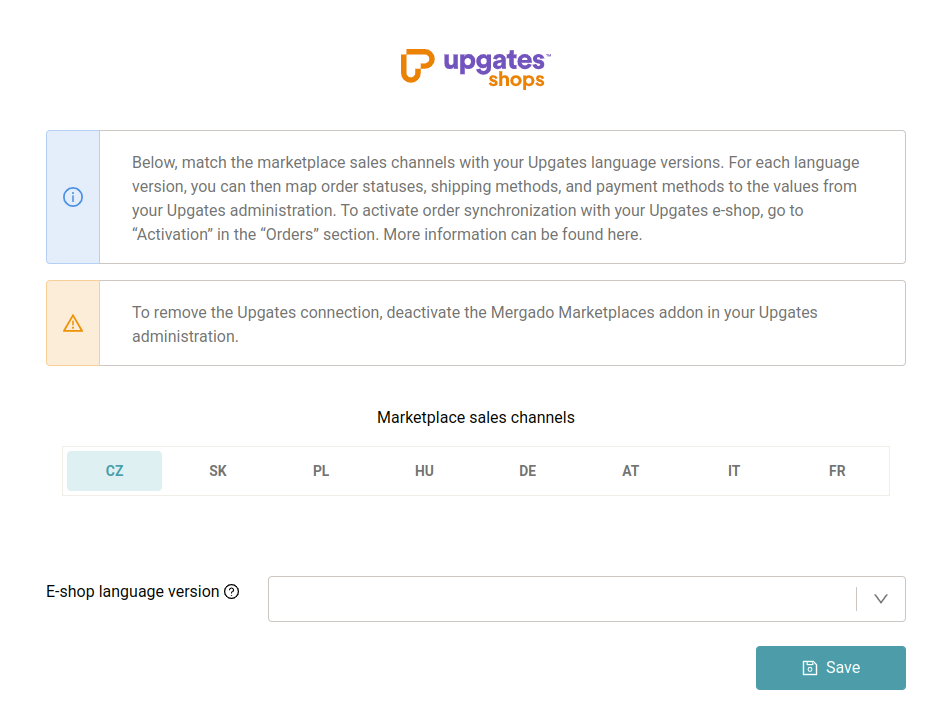
Once you have filled in the language versions, you can map the following for each market:
- Statuses from Mergado Marketplaces to your order statuses in Upgates
- If you do not map order statuses, new orders will be created in Upgates with the
Receivedstatus and further status changes will not be taken into account.
- If you do not map order statuses, new orders will be created in Upgates with the
- Payment and shipping methods to your values in Upgates
- In this section, shipping and payment method values are dynamically loaded based on incoming orders. It is therefore advisable to check this section regularly and map any new values that may have appeared.
- If you do not map shipping and payment methods, we will send the payment and shipping method to Upgates in the format we receive them from the marketplace.
⚠️ Please pay attention to at least mapping language versions and order statuses. Without mapping them, order synchronization will not work optimally.
ℹ️ VAT Rate To create an order in Upgates, it is mandatory to specify the VAT rate for order items. You can set the VAT rate in the settings of individual campaigns for both Allegro and Kaufland. If you do not have the VAT rate filled in for your offers, the standard VAT rate for the given country will be used.
How to activate orders?#
Once everything is ready, you can activate order synchronization for Upgates in the Orders > Activation section. For order synchronization to work correctly, orders must also be activated for at least one marketplace.
💡 How do you know it is a marketplace order? For each order, we send
Mergado Marketplaces importas an internal note on the order detail in Upgates. In theAdvancedsection, you will find the marketplace order ID underExternal Order Number.
Frequently Asked Questions#
What happens if I don’t map order statuses?
New orders will be created in Upgates with the Received status and further status changes on the marketplace will not be transferred to Upgates.
Is it necessary to set a VAT rate? Yes, specifying the VAT rate for order items is mandatory when creating an order in Upgates. If you don’t have it filled in, the standard VAT rate for the given country will be used.
How do I recognize a marketplace order in Upgates?
Each marketplace order contains an internal note Mergado Marketplaces import and the marketplace order ID can be found under External Order Number in the Advanced section.
Do I need to activate orders for the marketplace as well? Yes, for order synchronization to work correctly, orders must be activated both for Upgates and for at least one marketplace (Allegro or Kaufland).
What if I don’t map shipping and payment methods? Mergado Marketplaces will send the payment and shipping method to Upgates in the format received from the marketplace. We recommend checking this section regularly and mapping any new values.
🔗 For more information, see Order Management in Mergado Marketplaces or the guides for creating campaigns on Allegro and Kaufland.